A whole-home energy monitor can be worth it, but not for every house. It is most useful when you need faster, more detailed, or more actionable data than your utility bill or smart meter portal can provide.
For a normal household, the best reason to buy one is not curiosity. It is decision support. A good monitoring setup can help you find always-on load, understand heating and cooling behavior, check solar self-consumption, spot large appliance patterns, and decide whether upgrades such as a battery, EV charger, heat pump, or tariff change make sense.
But there is a catch: whole-home monitoring is only valuable if the data changes what you do. If you already get clear interval data from your retailer or utility, do not have solar, do not plan major upgrades, and only want a monthly usage total, a dedicated monitor may be more hardware than you need.
The Short Answer
A whole-home energy monitor is usually worth considering when at least one of these is true:
- your bills are high and you cannot explain why
- you want to identify always-on load or overnight consumption
- you have solar and want clearer import, export, and self-consumption visibility
- you are planning an EV charger, battery, heat pump, or major electrical upgrade
- you want near-real-time alerts or automation triggers
- you need data in Home Assistant, a local dashboard, or a long-term database
- you want to track major circuits rather than only total household usage
It is less likely to be worth it when your only goal is seeing monthly consumption, checking whether one appliance is expensive, or confirming a bill that already includes reliable half-hourly or hourly data.
What Counts as a Whole-Home Energy Monitor?
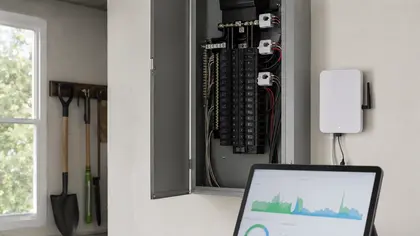
In this article, a whole-home energy monitor means a device or metering setup that measures electricity use at the main supply, switchboard, distribution board, or key household circuits. It may use current transformer clamps, DIN-rail metering, a gateway, a Wi-Fi module, Modbus, MQTT, a vendor cloud, or an integration platform.
That is different from a single smart plug. A plug monitor can tell you what one appliance uses. A whole-home monitor helps you understand the house as a system.
There are several common levels:
| Monitoring level | What it shows | Best fit |
|---|---|---|
| Utility bill only | Monthly or billing-period totals | Basic tracking and cost review |
| Smart meter portal | Interval import data, often delayed | Tariff checks and usage timing |
| Plug-in appliance monitor | One plug-in load | Fridges, dryers, office equipment, or mystery appliances |
| Whole-home main CT monitor | Total household demand in near real time | Always-on load, behavior changes, alerts |
| Solar-aware monitor | Import, export, solar production, and load | Solar self-consumption and export control decisions |
| Circuit-level monitor | Multiple circuits or major loads | EV charging, hot water, HVAC, pool pumps, workshops |
| Local/API-first meter | Data access for Home Assistant, MQTT, Modbus, or analytics | Automation, long-term records, and advanced users |
The right level depends on the question you are trying to answer.
When Smart Meter Data Is Enough
Before buying hardware, check what you already have. Many households can access smart meter interval data through a retailer, utility portal, downloadable file, or tariff comparison service. If that data is reliable, it can already answer several useful questions:
- Which days use the most electricity?
- Is usage higher overnight than expected?
- Do peak-price periods drive a large part of the bill?
- Is weekday usage different from weekend usage?
- Did consumption change after a new appliance, tenant, season, or work-from-home routine?
For tariff switching, bill review, and broad behavior analysis, smart meter data may be enough. It is especially useful when you can export hourly or half-hourly records and compare them with tariff periods.
The limitation is speed and detail. Utility data is often delayed, may not show individual circuits, and usually cannot tell you exactly which device caused a spike. If you want real-time feedback while turning appliances on and off, or if you want automation triggers, a dedicated monitor becomes more useful.
When a Whole-Home Monitor Starts Paying for Itself
A monitor does not save electricity by existing. It saves money only when it helps you make better decisions. The clearest payback cases usually involve one of four situations.
First, the house has a high base load. If the home never drops below a few hundred watts, even overnight, there may be hidden standby use, pumps, old refrigeration, networking equipment, underfloor heating, towel rails, dehumidifiers, or control systems running longer than expected. A whole-home monitor makes that baseline visible.
Second, the home has major flexible loads. Hot water, EV charging, pool pumps, HVAC, dryers, and battery charging can often be moved, controlled, or scheduled. Monitoring helps show whether these loads are happening at expensive times.
Third, the home has solar. Solar households need more than production data from the inverter. They also need to understand grid import, export, household load, and self-consumption. Without that view, it is easy to overestimate how much solar energy is actually being used onsite.
Fourth, the household is planning upgrades. If you are deciding between solar, a battery, a heat pump, an EV charger, insulation, or a tariff change, real load data can prevent expensive guesswork.
Whole-Home Monitoring vs Appliance Monitoring
If you only care about one appliance, start smaller. A plug-in meter or smart plug with energy monitoring can be enough for a fridge, freezer, dryer, entertainment setup, office desk, or portable heater.
Whole-home monitoring becomes more useful when the problem is not one obvious appliance. It helps when usage is spread across the house, when loads overlap, when several circuits matter, or when you need to understand timing.
A useful way to decide is this:
| If your question is... | Start with... |
|---|---|
| How much does this fridge or dryer use? | Plug-level monitor |
| Why is the house using power all night? | Whole-home monitor or smart meter interval data |
| What is my solar self-consumption? | Solar-aware whole-home monitoring |
| Is EV charging pushing the house near its limit? | Circuit-level monitoring or charger load management data |
| Which tariff is cheaper? | Smart meter interval data first |
| Can I automate based on live surplus solar? | Local/API-friendly meter or inverter-compatible meter |
Features That Actually Matter
When comparing whole-home monitors, ignore the app screenshots for a moment and check the underlying capabilities.
Real-Time Power and Historical Energy
A good monitor should show live power in watts or kilowatts and historical energy in kWh. Live power helps with troubleshooting. Historical energy helps with bills, tariffs, and long-term decisions.
Both matter. A monitor that only gives a pretty live dashboard but weak history will be frustrating later. A monitor with good history but slow updates may be fine for reporting but poor for real-time behavior changes.
Import, Export, and Direction
For solar homes, direction matters. The monitor must distinguish grid import from grid export, not just show one net number that is hard to interpret. If export is shown with confusing negative values or inconsistent sign conventions, dashboards and automations can become misleading.
Circuit-Level or Major-Load Tracking
Circuit-level monitoring is not always necessary, but it is valuable when you have big loads such as EV charging, hot water, HVAC, pool equipment, workshops, or electric cooking. The ability to separate those circuits can turn vague data into clear decisions.
Local Data Access
Cloud apps are convenient, but local access can matter if you want Home Assistant, Node-RED, InfluxDB, Grafana, MQTT, Modbus, or your own reporting. If the monitor is cloud-only, check export options, update interval, data retention, and whether the platform has a history of maintaining integrations.
Installation Fit
Some monitors are DIY plug-in devices, while others require a licensed electrician. Clamp-style CT systems can be easier to retrofit than full DIN-rail metering, but the correct choice depends on panel space, supply type, number of phases, safety rules, and whether you need revenue-grade accuracy.
What It Can Help You Find
A whole-home monitor can reveal patterns that are hard to see from a monthly bill:
- a base load that never turns off
- electric hot water running during expensive tariff windows
- air conditioning cycling more often than expected
- a second fridge or freezer consuming more than assumed
- pool pumps, dehumidifiers, heaters, or towel rails running too long
- solar export rising while household loads still run later from the grid
- EV charging overlapping with peak demand or other large appliances
- standby loads from networking, entertainment, security, or automation gear
The important part is not just seeing the pattern. It is having a practical next step: switch a schedule, retire an old appliance, change a tariff, add load management, adjust solar usage, or verify whether an upgrade has enough data behind it.
What It Will Not Do
A monitor will not automatically lower the bill. It also will not perfectly identify every appliance unless it has enough circuit-level data or reliable device detection.
Be cautious with marketing that suggests a monitor can always identify every appliance from the main supply alone. Some systems do a reasonable job with certain loads, but device disaggregation is never magic. Similar appliances can look alike, variable-speed devices can be hard to classify, and real homes are electrically noisy.
Also remember that monitoring is not a substitute for safe electrical design. If you are planning an EV charger, battery, solar system, or switchboard upgrade, use monitoring data as an input, not as the final electrical approval.
A Simple Buying Checklist
Before buying a whole-home monitor, ask these questions:
- What exact decision will this monitor help me make?
- Do I already have smart meter interval data that answers the question?
- Do I need live data, or is delayed daily data enough?
- Do I need solar import/export visibility?
- Do I need circuit-level data for EV charging, hot water, HVAC, or other large loads?
- Does the device support my home supply type, such as single-phase or three-phase?
- Can it export data or integrate with the systems I use?
- Is it cloud-only, local-first, or both?
- Will installation require an electrician, and is there enough panel space?
- What happens if the vendor app, account, or cloud service changes?
If you cannot answer the first question, wait. Monitoring works best when it is attached to a real decision.
Who Should Probably Buy One
A whole-home monitor is a strong fit for households with unexplained high bills, solar systems, EV charging plans, batteries, heat pump upgrades, time-of-use tariffs, or a genuine interest in automation and long-term data.
It is also a good fit for technical users who want local data access and for homeowners who are about to spend serious money on energy upgrades. In those cases, a few weeks of good data can be more useful than another generic estimate.
Who Probably Does Not Need One Yet
You may not need a whole-home monitor if your bills are already low, your usage pattern is simple, you do not have solar or major flexible loads, and your retailer already gives usable interval data.
You also may not need one if the real question is about a single appliance. Start with a plug-level monitor, confirm the issue, and only move to whole-home monitoring if the pattern is broader.
Bottom Line
A whole-home energy monitor is worth it when it helps you make better energy decisions: finding hidden load, improving solar self-consumption, planning EV charging, choosing tariffs, checking upgrades, or feeding a local data system.
It is not automatically worth it just because the dashboard looks useful. The best monitor is the one that matches the question you need answered, the level of detail you will actually use, and the data access path you may need later.
For many households, the right sequence is simple: check smart meter data first, use plug-level monitoring for single-appliance questions, and choose a whole-home monitor when the house itself has become the question.
Related Reading
- How to Find Your Home's Always-On Power Load and Cut It
- Is a Smart Meter Worth It If You Do Not Have Solar?
- What a Good Solar Home Monitoring Setup Should Include Beyond the Inverter App
- Who Should Keep Their Energy Data Local and Who Probably Does Not Need To
- How to Choose an Energy Meter If You Care More About Data Access Than App Design
- Smart Meter Selector