Who Should Keep Their Energy Data Local and Who Probably Does Not Need To
Energy monitoring is no longer just a monthly bill check. A modern home or small site may have rooftop solar, export tariffs, a battery, an EV charger, a heat pump, time-of-use pricing, and several apps that all claim to explain what is happening. In that environment, the question is not only what meter should I buy? It is also where should the data live?
For some users, a polished cloud app is the right answer. It is simple, remote-friendly, and usually good enough for finding heavy loads or checking solar performance. For others, cloud-only monitoring becomes a weak point. They need local access because they are automating around solar surplus, comparing tariffs, protecting operational data, or building a Home Assistant, MQTT, Modbus, InfluxDB, or Grafana stack that must keep working even when a vendor app is unavailable.
This guide gives a practical way to decide. It is written for homeowners, installers, energy consultants, facility managers, and technically curious buyers who want energy data that supports real decisions instead of another dashboard they stop trusting after a few weeks.
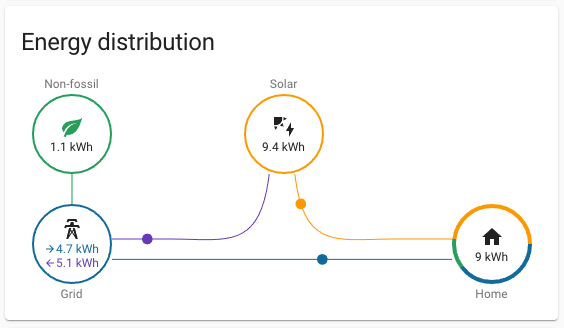
A local dashboard is most valuable when the data path is intentional: meter, network, storage, dashboard, and automation all need to agree on what each number means.
What Local Energy Data Actually Means
Keeping energy data local does not always mean rejecting the cloud entirely. It usually means at least one of these things is true:
- The meter exposes readings directly over the local network.
- The device supports a local API, MQTT, Modbus/TCP, HTTP, WebSocket, or another open interface.
- A local system such as Home Assistant, a gateway, or a small server stores the readings before they are sent anywhere else.
- Automations can use live readings without waiting for a vendor cloud round trip.
- Historical data can remain available even if a subscription, app, internet connection, or vendor service changes.
That is different from a cloud-first monitor that measures inside your panel, sends readings to the vendor cloud, and then lets the app or web portal show results. Cloud-first products can still be excellent, especially for buyers who want fast setup and little maintenance. The tradeoff is that your practical access to the data depends on the vendor's data model, internet path, app design, and export options.
The important distinction is not ideological. It is operational. If your energy data only informs casual behavior, cloud is often fine. If that data controls devices, verifies bills, diagnoses solar performance, or feeds business reporting, local access starts to matter.
Keep Data Local If It Drives Automation
The strongest reason to keep energy data local is automation.
If a system is only showing yesterday's kWh, a cloud app may be enough. But if the readings are used to make live decisions, latency and availability become more important. Examples include:
- Diverting solar surplus to an EV charger, water heater, or battery.
- Reducing EV charging power when the main supply is near its limit.
- Turning on flexible loads only when export rises above a threshold.
- Preventing a heat pump, oven, and charger from exceeding panel headroom.
- Switching tariff-aware loads based on local metering and price inputs.
These are not just dashboard features. They are control loops. A control loop should not depend on a slow refresh interval, a phone app being open, or a cloud API that may change without your installer noticing.
Home Assistant's privacy and security documentation is a useful reference point here: Home Assistant runs on the user's own hardware, stores data locally, and, where supported, talks to devices directly over the local network. That model suits energy automation because the system can continue making local decisions even when remote access is optional rather than required.
For device selection, this usually means looking for meters and controllers that expose local readings through MQTT, HTTP, Modbus/TCP, or an officially documented local interface. A device that can only be read through the vendor app may still be useful for monitoring, but it is weaker as the measurement layer for automation.
Keep Data Local If You Need Better Troubleshooting
Local data also helps when you need to prove what happened.
Solar and energy systems often fail in subtle ways. A CT clamp may face the wrong direction. Import and export may be mixed. A battery may charge from the grid when the owner expected solar-only operation. A charger may start during the wrong tariff window. A three-phase site may look balanced in one app while one phase is carrying most of the real load.
Cloud apps usually summarize. Local data lets you inspect.
That matters for installers and energy professionals because troubleshooting often requires higher-resolution readings, stable timestamps, and the ability to compare several sources. A local stack can preserve raw or near-raw meter readings, correlate them with inverter data, and show whether the issue is measurement, wiring, configuration, or user expectation.
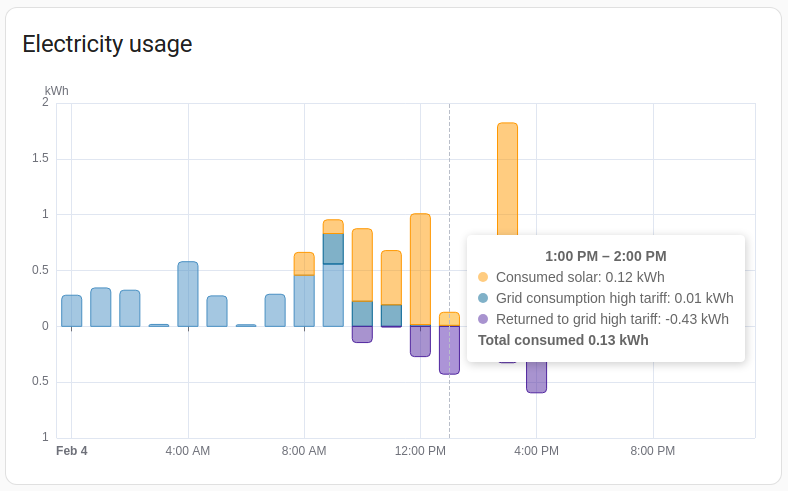
Local storage makes it easier to compare import, export, solar production, battery flow, and major loads without losing context inside separate vendor apps.
A practical example: Home Assistant's Energy Dashboard needs accumulated energy sensors with the right metadata for long-term statistics. MQTT sensors and local integrations can work well, but only when units, device class, state class, and reset behavior are correct. Local access does not automatically make data clean, but it gives you the tools to audit and correct the measurement chain.
Keep Data Local If Privacy or Commercial Sensitivity Matters
Energy data can reveal more than many people expect.
A daily kWh total is not very sensitive by itself. A high-resolution circuit-level data stream can reveal occupancy patterns, equipment schedules, production cycles, EV charging habits, appliance use, and operational routines. For a normal household, this may be acceptable. For a small business, workshop, farm, rental property operator, clinic, or managed facility, it may not be.
Local storage gives the owner more control over retention, access, backup, and sharing. It also lets a consultant or integrator build reporting without sending every reading through a third-party consumer app.
This does not mean every privacy-conscious buyer must self-host everything. It means the risk should match the use case. A homeowner who only wants monthly solar self-consumption trends may not need a local database. A business that uses energy data to infer production output probably should not treat the data as a casual app feed.
A simple rule works well: if the energy profile could reveal commercially sensitive behavior, treat the data path like part of the site's IT architecture, not just a gadget choice.
Keep Data Local If Internet Outages Would Break the Use Case
Many cloud-first energy monitors keep measuring when the internet drops, but the user experience varies. Some devices buffer readings temporarily and upload later. Others may lose fine-grained detail after a longer outage, or the app may be unable to read directly from the device while the cloud path is unavailable.
That distinction matters for three different users:
- A homeowner checking weekly usage may not care if a short outage is averaged later.
- A solar owner using surplus automation may care immediately.
- A business using energy data for operational reporting may need a reliable local record.
Emporia's own Vue offline behavior documentation is a good example of the tradeoff: the monitor continues measuring and can buffer short interruptions, but it is still a cloud-based device without direct local data access through the app. That can be perfectly acceptable for many buyers. It is less ideal if the goal is a local control loop or independent data archive.
By contrast, devices such as Shelly Pro 3EM and IAMMETER Wi-Fi meters are positioned around local LAN operation and open interfaces such as MQTT, HTTP, WebSocket, Modbus/TCP, or local API access. That does not automatically make them the right meter for every panel, region, or electrician, but it does make them stronger candidates when local data ownership is part of the requirement.
Cloud Is Probably Enough If You Mainly Want Simple Insight
Local data has benefits, but it also has costs.
A local setup usually needs more decisions: where the data is stored, how backups work, which device is the source of truth, how sensors are named, how units are normalized, and who maintains the system after installation. A poor local setup can be less useful than a good cloud app.
Cloud monitoring is probably enough if:
- You mainly want to find large loads and reduce obvious waste.
- You do not plan to automate EV charging, batteries, or water heating from live meter data.
- You are comfortable with the vendor app as the main interface.
- Occasional internet outages are inconvenient but not operationally important.
- You do not need raw data exports, long-term local storage, or custom dashboards.
- The device is installed for one household, not a client, tenant, or business process.
This is why cloud-first products remain popular. They lower the barrier to useful energy visibility. For many users, that is the right tradeoff.
The mistake is buying a cloud-only system and later expecting it to behave like an open measurement platform. If future local automation, custom reporting, or vendor-independent data access might matter, make that decision before choosing hardware.
A Practical Decision Matrix
Use this matrix before buying a meter or redesigning an energy monitoring setup.
| User profile | Local data priority | Why |
|---|---|---|
| Homeowner checking bills and major loads | Low to medium | A good cloud app may provide enough insight with less maintenance. |
| Solar owner trying to increase self-consumption | Medium to high | Local import/export and load data make timing decisions more reliable. |
| EV owner using dynamic load management | High | Live local readings help avoid service-limit problems and slow cloud loops. |
| Battery owner tuning charge and reserve behavior | High | Battery, solar, grid, and load data need consistent boundaries. |
| Home Assistant user | High | Local APIs and MQTT make the dashboard and automations more resilient. |
| Installer supporting multiple clients | Medium to high | Local access helps troubleshooting, commissioning, and evidence capture. |
| Small business or facility manager | High | Data may be operationally sensitive and useful for reporting. |
| Landlord or property manager | Medium | Cloud simplicity helps, but ownership and access rules should be clear. |
| User who dislikes maintenance | Low | A self-hosted stack can become a burden if nobody wants to maintain it. |
The right answer is not always "local first." The right answer is "local where the consequences justify it."
What To Look For in a Local-Friendly Energy Meter
If local data matters, do not judge a meter only by app screenshots. Check the data path.
Look for these capabilities:
- A documented local API or protocol, not only a reverse-engineered workaround.
- MQTT, HTTP, Modbus/TCP, WebSocket, or another integration path your system can actually use.
- Clear support for single-phase, split-phase, or three-phase installations as required by the site.
- Separate import and export readings for solar homes, not only net energy.
- Stable units and accumulated energy counters suitable for long-term statistics.
- A local web interface or LAN setup mode for commissioning and diagnostics.
- Reasonable behavior when the internet connection is down.
- Compatibility with Home Assistant or the user's chosen monitoring stack.
Also check what "local" does not cover. Some devices expose live readings locally but still need cloud registration for setup. Some expose power but not clean accumulated energy. Some support MQTT but require careful topic configuration. Some local APIs are unofficial and may change. The details matter.
For solar and battery homes, measurement boundaries matter just as much as data access. A meter that reports a clean local number from the wrong place in the circuit will still produce misleading automation and charts.

Local data is most useful when each sensor has a clear role: grid import, grid export, solar production, battery charge/discharge, or individual load.
A Good Hybrid Approach
Many of the best real-world systems are hybrid.
A homeowner might use the vendor cloud app for quick remote checks, warranty support, and family-friendly views, while also sending local MQTT or Modbus readings into Home Assistant for automations and long-term analysis. An installer might leave the customer with a simple app, but keep a commissioning path that allows local verification. A small business might keep high-resolution local data while exporting monthly summaries to a cloud reporting tool.
This hybrid model often gives the best balance:
- Cloud for convenience and remote access.
- Local data for control, validation, and ownership.
- Clear documentation so future users know which system is the source of truth.
The key is avoiding silent duplication. If the inverter app, smart meter app, Home Assistant dashboard, and battery portal all show different numbers, users lose trust. Choose one measurement boundary for each decision and document it.
Common Mistakes To Avoid
The most common mistake is treating local access as a feature checkbox. It is not enough for a device to say "API" somewhere in the brochure. You need to know which readings are available, at what interval, in which units, and whether the interface is stable enough for your use case.
A second mistake is overbuilding. A household that only wants a cleaner monthly bill view does not need a local database, message broker, and custom dashboard on day one. Start with the decision the data must support, then choose the simplest architecture that supports it.
A third mistake is ignoring maintenance. Local systems need backups, updates, naming discipline, and occasional troubleshooting. If nobody will maintain the setup, design it to be boring: fewer moving parts, official integrations, and clear documentation.
Finally, do not confuse privacy with isolation. A local-first system can still be insecure if remote access is exposed poorly or credentials are reused. Home Assistant's security guidance recommends keeping systems updated, centralizing secrets, and using safer remote-access patterns such as Home Assistant Cloud, VPN, or properly configured TLS rather than casually exposing local services.
Bottom Line
Keep energy data local when it affects control, reliability, privacy, troubleshooting, or long-term ownership. That usually includes serious Home Assistant users, solar owners optimizing self-consumption, EV charger setups with load management, battery homes, installers, consultants, and businesses that treat energy data as operational information.
Cloud monitoring is still a good fit when the goal is simple visibility, easy remote access, and low maintenance. A well-designed cloud app can be more useful than a local stack nobody maintains.
The best buying question is not "local or cloud?" It is: what decision will this data support, and what happens if the app, internet connection, vendor API, or subscription is not available when I need it? Once you answer that honestly, the right meter and monitoring architecture become much easier to choose.
Sources
- Home Assistant: Is my smart home data private with Home Assistant?
- Home Assistant: Securing your Home Assistant
- Home Assistant: MQTT sensor documentation
- Home Assistant Developer Docs: Sensor entity and long-term statistics
- IAMMETER: Wi-Fi Energy Meter Local Integration and Open Interface Guide
- IAMMETER Open: Develop your own energy monitoring system
- Shelly: Shelly Pro 3EM documentation
- Emporia Help Center: Vue Offline Behavior