IAMMETER WEM3080 vs Shelly EM: Which Is Better for Solar Homes?
IAMMETER WEM3080 and Shelly EM Gen3 both make sense for homeowners who want clearer electricity data without buying a full smart panel. They are especially interesting for solar homes because they can help expose the missing numbers that many inverter apps do not show well: grid import, grid export, household load, and the live relationship between solar production and consumption.
The short version: choose IAMMETER WEM3080 if you want a dedicated DIN-rail solar import/export meter with a more solar-monitoring-oriented software path. Choose Shelly EM Gen3 if you want a compact two-channel CT meter that is easier to fit into targeted monitoring jobs and local smart-home automations.
Neither product is automatically better. The better choice depends on whether your priority is a clean solar metering boundary, a flexible local automation component, or a narrow retrofit job in a cramped panel.
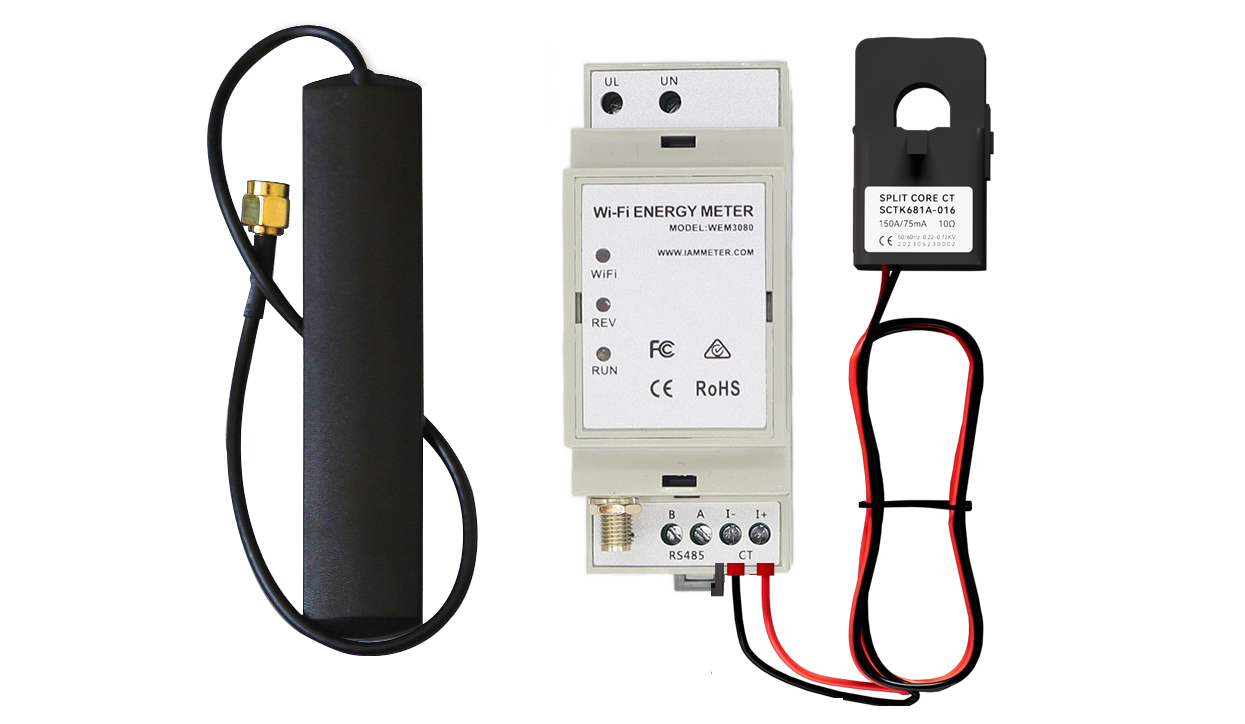 IAMMETER WEM3080 is built around a DIN-rail meter plus external CT, which makes it a more meter-like choice for single-phase solar import/export tracking.
Quick Recommendation
If your goal is to add one clear meter for a single-phase solar home, IAMMETER WEM3080 is usually the more natural starting point. IAMMETER positions WEM3080 as a single-phase Wi-Fi energy meter for real-time electricity monitoring, solar energy tracking, home energy management, and bidirectional import/export measurement.
If your goal is to monitor one or two important circuits, feed data into Home Assistant, trigger local automations, or fit a device into a tight retrofit location, Shelly EM Gen3 is usually easier to justify. Shelly describes EM Gen3 as a small-form-factor smart energy meter using up to two current transformers, with local Wi-Fi operation as well as cloud operation.
For many solar homes, the practical split looks like this:
| Buying question | Better fit | Why |
|---|---|---|
| I want one dedicated meter for grid import/export in a single-phase solar system | IAMMETER WEM3080 | It is designed as a bidirectional DIN-rail Wi-Fi meter for single-phase systems and solar monitoring |
| I want to monitor one or two circuits without instrumenting the whole panel | Shelly EM Gen3 | It supports up to two CT channels and is compact enough for targeted retrofit jobs |
| I want a ready solar monitoring path with IAMMETER Cloud or IAMMETER local options | IAMMETER WEM3080 | IAMMETER provides cloud, local, API, and solar-monitoring documentation around the meter |
| I want local smart-home protocols and a compact automation component | Shelly EM Gen3 | Shelly lists scripting, webhooks, MQTT, WebSocket, HTTP, and RPC support |
| I need broad circuit-level monitoring across many breakers | Neither as a single device | Look at a multi-circuit monitor such as Emporia Vue 3, a smart panel, or a larger CT monitoring system |
What IAMMETER WEM3080 Does Better
WEM3080 is strongest when the job is solar-aware whole-home metering rather than broad circuit discovery. The important distinction is that it is not trying to explain every appliance in the panel. It is trying to give the system a reliable measurement point.
That matters because solar homes often suffer from boundary confusion. The inverter app may know production, but not total household demand. The utility meter may know import and export, but not present it in a live dashboard. A plug monitor may show one appliance, but not the net energy flow at the grid connection.
IAMMETER's own WEM3080 material describes the device as a single-phase, DIN-rail mounted, bidirectional Wi-Fi energy meter that can measure voltage, current, power, and energy consumption. IAMMETER also documents a solar PV use case where one WEM3080 can monitor energy consumed from the grid and energy exported to the grid in a single-phase solar PV system.
That makes WEM3080 a good fit when you want to answer questions like:
- How much power is the house importing right now?
- Is the solar system exporting, self-consuming, or still importing from the grid?
- How much daytime solar is being wasted as export?
- Does a battery, EV charger, heat pump, or hot water load actually reduce grid imports?
- Can this meter feed a cloud dashboard now and a local dashboard later?
WEM3080 also has a clearer software story for energy-monitoring readers who want several paths. IAMMETER documents IAMMETER Cloud, mobile app access, local monitoring, MQTT, HTTP/TCP/TLS, REST-style integrations, Node-RED, OpenHAB, and Home Assistant routes.
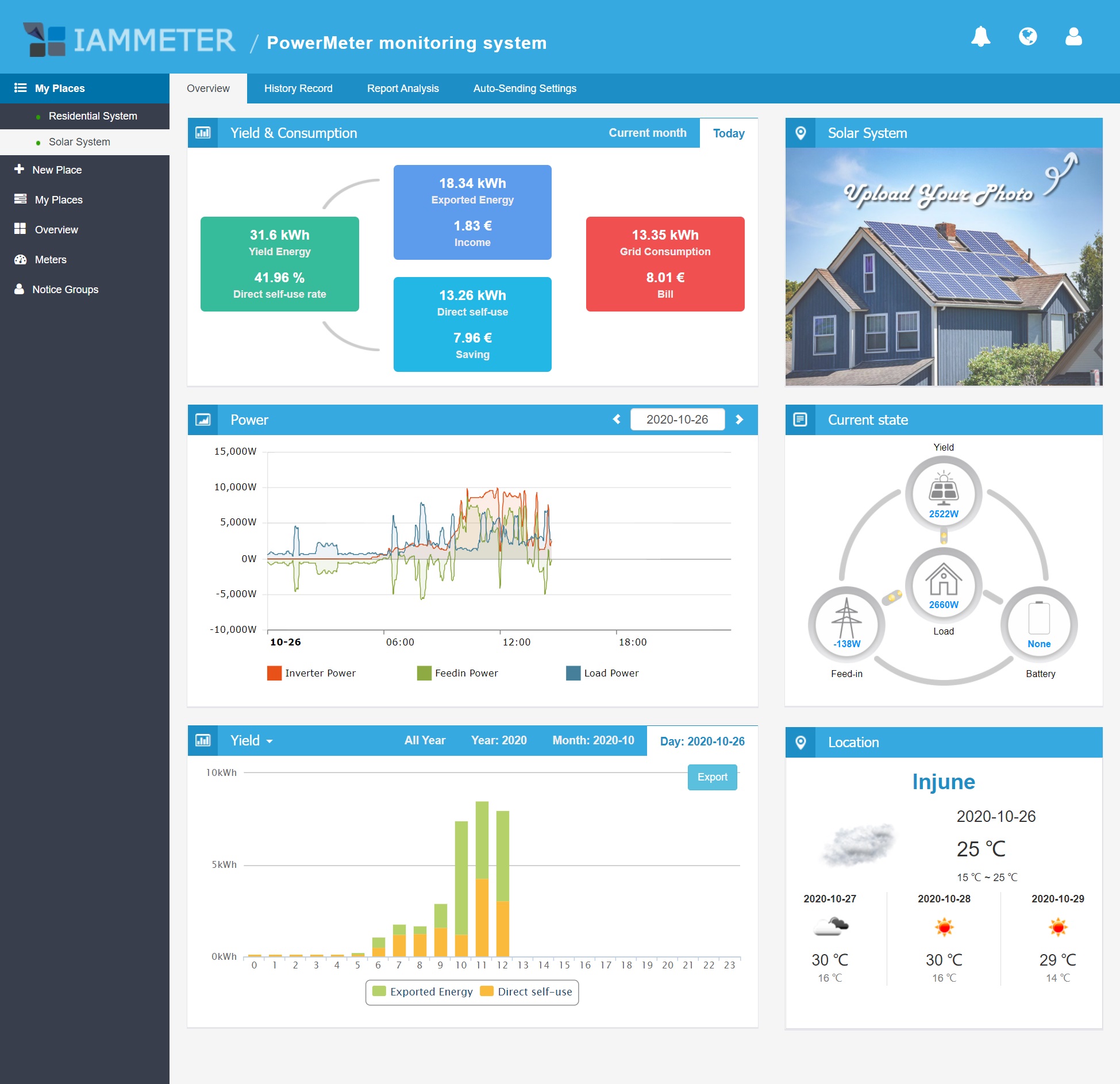 IAMMETER's software path is built around solar yield, import/export, self-use, billing, and monitoring reports rather than only raw CT readings.
What Shelly EM Gen3 Does Better
Shelly EM Gen3 is strongest when the monitoring problem is narrower, more local, and more automation-oriented.
Shelly's official product page describes EM Gen3 as a small-form-factor smart energy meter using up to two current transformers. It supports Wi-Fi and Bluetooth, single-phase two-channel measurement, a dry-contact switch for contactor control, local data logs stored on the device for up to 10 days in one-minute intervals, and protocol options including scripting, webhooks, MQTT, WebSocket, HTTP, and RPC.
That set of features makes Shelly EM Gen3 feel less like a dedicated solar meter and more like a compact data source inside a smart-home system. It can be used for grid import/export in simple cases, but it is also useful for targeted loads such as:
- heat pump hot water;
- pool pump or circulation pump;
- workshop sub-feed;
- a small solar AC circuit;
- an EV charger feed where a full charger-specific meter is not required;
- a single important appliance or two-channel monitoring job.
The dry-contact output is also a useful distinction. It is not a substitute for a proper load-management system, and electrical design still matters, but it gives Shelly EM a more direct control angle when paired with a suitable contactor and installed correctly.
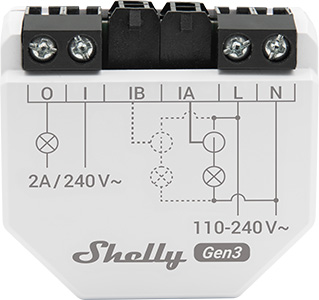 Shelly EM Gen3 is physically compact and better suited to targeted CT monitoring and local automation jobs than to broad multi-circuit panel visibility.
Solar Import and Export Monitoring
For a single-phase solar home, the most important question is not only whether a device can measure energy. It is whether the measurement boundary matches the decision you are trying to make.
If you place a meter at the grid connection and configure CT direction correctly, the main value is import/export clarity. That is where IAMMETER WEM3080 has the cleaner product story. IAMMETER's quick-start documentation explicitly describes using one WEM3080 in a single-phase solar PV system to monitor power from the grid and power to the grid.
Shelly EM Gen3 can also be used for import/export or solar-adjacent monitoring, especially in a simple single-phase setup. But because it has two CT channels and a more general-purpose automation profile, you need to be more intentional about what each channel measures. One channel might monitor the grid feed, while the other monitors a solar circuit or a major load. That flexibility is useful, but it also means the dashboard may need more manual setup and interpretation.
A good rule is:
- If you want the solar metering boundary to be the center of the setup, start with WEM3080.
- If you want a compact meter you can assign to a few high-value circuits, Shelly EM Gen3 may be the more flexible part.
Local Data, Cloud Dependency, and APIs
Both products can support cloud-backed use, and both can support local or third-party integration paths. The emphasis is different.
IAMMETER gives you a fairly direct growth path: start with IAMMETER Cloud and the mobile/web app, then use Home Assistant, MQTT, local monitoring, IAMMETER-Docker, or other integration methods if your setup becomes more advanced. This is useful for readers who want a solar dashboard now but do not want to lose access to their data later.
Shelly EM Gen3 is appealing for the opposite reason: it behaves like a local smart-home device from the beginning. Shelly's documentation says it can work standalone on a local Wi-Fi network or through cloud home automation services, and it includes an embedded web interface. Its protocol list also makes it attractive for local automation users who already think in terms of MQTT topics, HTTP endpoints, RPC calls, and Home Assistant entities.
The practical difference is this:
- WEM3080 is more likely to feel like an energy-monitoring product with cloud, local, and API options.
- Shelly EM Gen3 is more likely to feel like a smart-home component that can measure energy well.
That distinction matters more than the spec sheet. It affects who will maintain the setup, where the data will be viewed, and how much work is needed after installation.
Home Assistant Fit
Home Assistant users can make either meter work, but the experience is not identical.
Home Assistant's IAMMETER integration page lists WEM3080 as a bidirectional single-phase energy meter and exposes sensors for voltage, current, active power, import energy, and export energy. IAMMETER's own documentation also describes multiple Home Assistant integration methods, including the core integration, Modbus/TCP, MQTT, HACS, and MQTT discovery.
Shelly devices also have a strong Home Assistant reputation, and Shelly EM Gen3's protocol support makes it a natural fit for users who want fast local automations. If your Home Assistant dashboard is the main interface and you only need one or two measured channels, Shelly EM Gen3 is attractive.
The decision should follow your dashboard goal:
- Choose WEM3080 if Home Assistant is part of a solar import/export monitoring plan.
- Choose Shelly EM Gen3 if Home Assistant is part of a broader local automation plan and two CT channels are enough.
- Choose a larger circuit monitor if you expect Home Assistant to show many individual breakers.
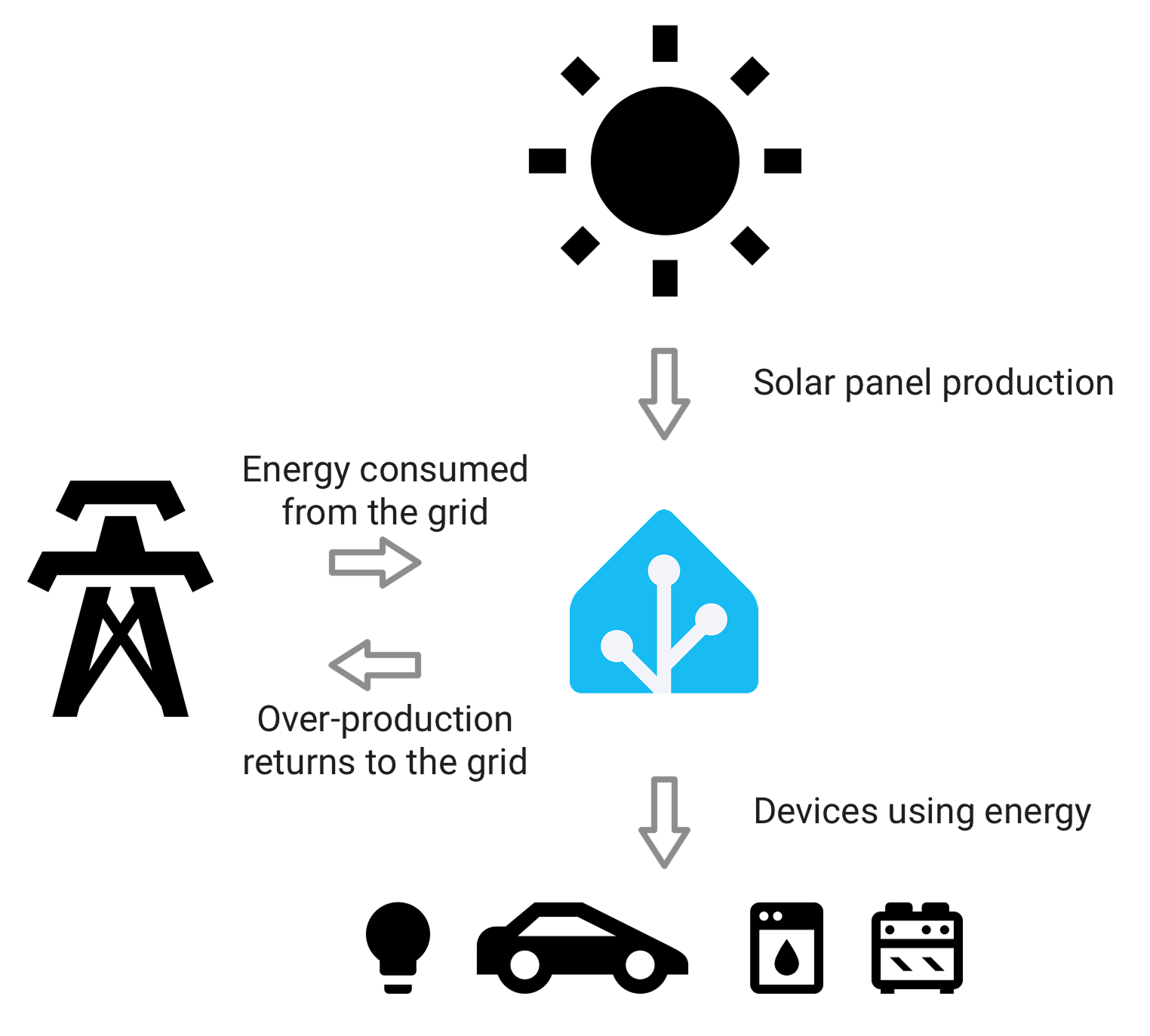 Home Assistant changes the buying decision: the best meter is the one that produces clean entities for the dashboard and automations you actually plan to use.
Installation and Panel Fit
Both products belong near electrical wiring, so installation should follow local electrical rules and should be handled by a qualified person where required. Do not treat either device as a casual plug-in accessory.
WEM3080 is DIN-rail mounted and uses an external CT. That can be cleaner in a distribution board where there is rail space and the goal is a stable metering point. It may be less convenient if the panel is packed or if there is no suitable mounting location.
Shelly EM Gen3 is more compact and can be retrofitted into standard electrical wall boxes, near appliances, power sockets, or limited-space locations according to Shelly's product documentation. That physical flexibility is a real advantage for targeted monitoring, but CT orientation, conductor access, Wi-Fi quality, and enclosure safety still matter.
Before choosing either one, check:
- whether the home is single-phase, split-phase, or three-phase;
- whether the CT rating and conductor size match the circuit;
- whether you need grid import/export, solar AC output, load monitoring, or all three;
- whether the enclosure has enough physical space and safe routing;
- whether Wi-Fi signal is reliable at the installation point;
- whether local electrical rules allow the intended installation path.
Where Each Meter Can Disappoint
WEM3080 can disappoint buyers who expect it to identify every appliance. It is better at solar and whole-home boundary metering than at broad circuit-level breakdown. If your main frustration is not knowing whether the dryer, HVAC, oven, and EV charger are all contributing separately to the evening peak, a one-meter setup will not solve that by itself.
Shelly EM Gen3 can disappoint buyers who expect a full solar monitoring product out of the box. It gives you flexible readings and integrations, but you may need to build more of the dashboard logic yourself. It also has only two CT channels, so it is not a substitute for a multi-circuit panel monitor.
Both products can disappoint if installed at the wrong measurement point. A perfectly good meter in the wrong place can produce numbers that look precise but answer the wrong question.
Which One Should You Buy?
Buy IAMMETER WEM3080 if:
- you have a single-phase solar home;
- your priority is grid import/export visibility;
- you want a DIN-rail energy meter rather than a tiny retrofit module;
- you want IAMMETER Cloud, solar reports, or IAMMETER local/API options;
- you want Home Assistant import/export entities without building everything from scratch;
- you may later grow into IAMMETER-Docker, MQTT, or custom data collection.
Buy Shelly EM Gen3 if:
- you need one or two CT channels for a targeted monitoring job;
- you care about compact physical fit;
- you already use Shelly or Home Assistant locally;
- you want MQTT, HTTP, WebSocket, RPC, scripting, or local automations;
- you want to monitor and possibly control a load through a suitable contactor design;
- you are comfortable building your own dashboard or automation logic.
Avoid both as your only monitoring device if your real need is full circuit disaggregation. For that, compare multi-circuit monitors, smart panels, or a more structured CT monitoring system.
Practical Bottom Line
For a solar homeowner choosing one device today, IAMMETER WEM3080 is the cleaner choice when the job is solar import/export metering. It is purpose-aligned, solar-aware, and easier to explain as the main measurement point in a single-phase solar setup.
Shelly EM Gen3 is the cleaner choice when the job is targeted local monitoring and automation. It is compact, protocol-friendly, and useful when two channels are enough.
The best setup may even use both styles over time: a dedicated meter for the main solar/grid boundary, plus smaller CT devices for loads that deserve separate attention. The important thing is not to buy hardware first and invent the use case later. Decide which energy question you need answered, then choose the meter that measures that boundary cleanly.
Related EnergyMeterHub Pages
- IAMMETER WEM3080 Review: Single-Phase Wi-Fi Energy Meter for Solar Homes
- Shelly EM vs Emporia Vue 3: Which Home Energy Monitor Fits Your House Better?
- How to Choose an Energy Meter If You Care More About Data Access Than App Design
- What a Good Solar Home Monitoring Setup Should Include Beyond the Inverter App
- Home Assistant Energy Dashboard: Complete Setup Guide for Smart Meters