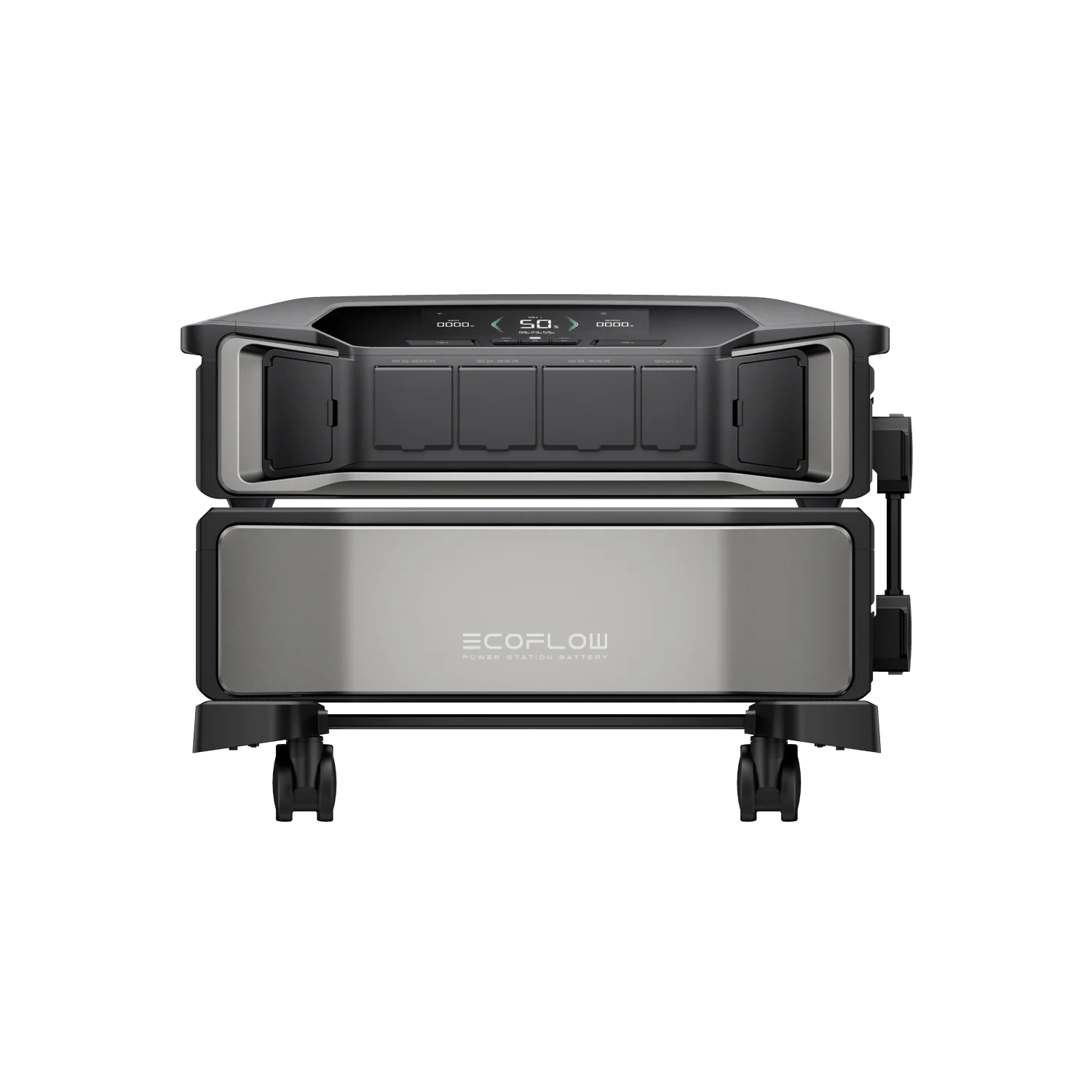
A home battery becomes much easier to live with when you can see four things in the same place: solar production, grid import and export, battery charge and discharge, and the real load of the home. If those numbers live in separate apps, the system can look healthy while still hiding the reason your battery is empty at 9 p.m., why exports are lower than expected, or why backup circuits drain faster than planned.
The best monitoring setup depends on what you are trying to manage. A vendor app may be enough if you only need a simple backup status screen. A local dashboard or open energy platform becomes more valuable when you want to compare devices, automate charging, verify tariffs, troubleshoot solar self-consumption, or combine a battery with an EV charger, heat pump, or separate circuit meter.
This guide explains the practical monitoring layers, what each one is good for, and how to avoid the common data mistakes that make a battery system harder to understand after you add more hardware.
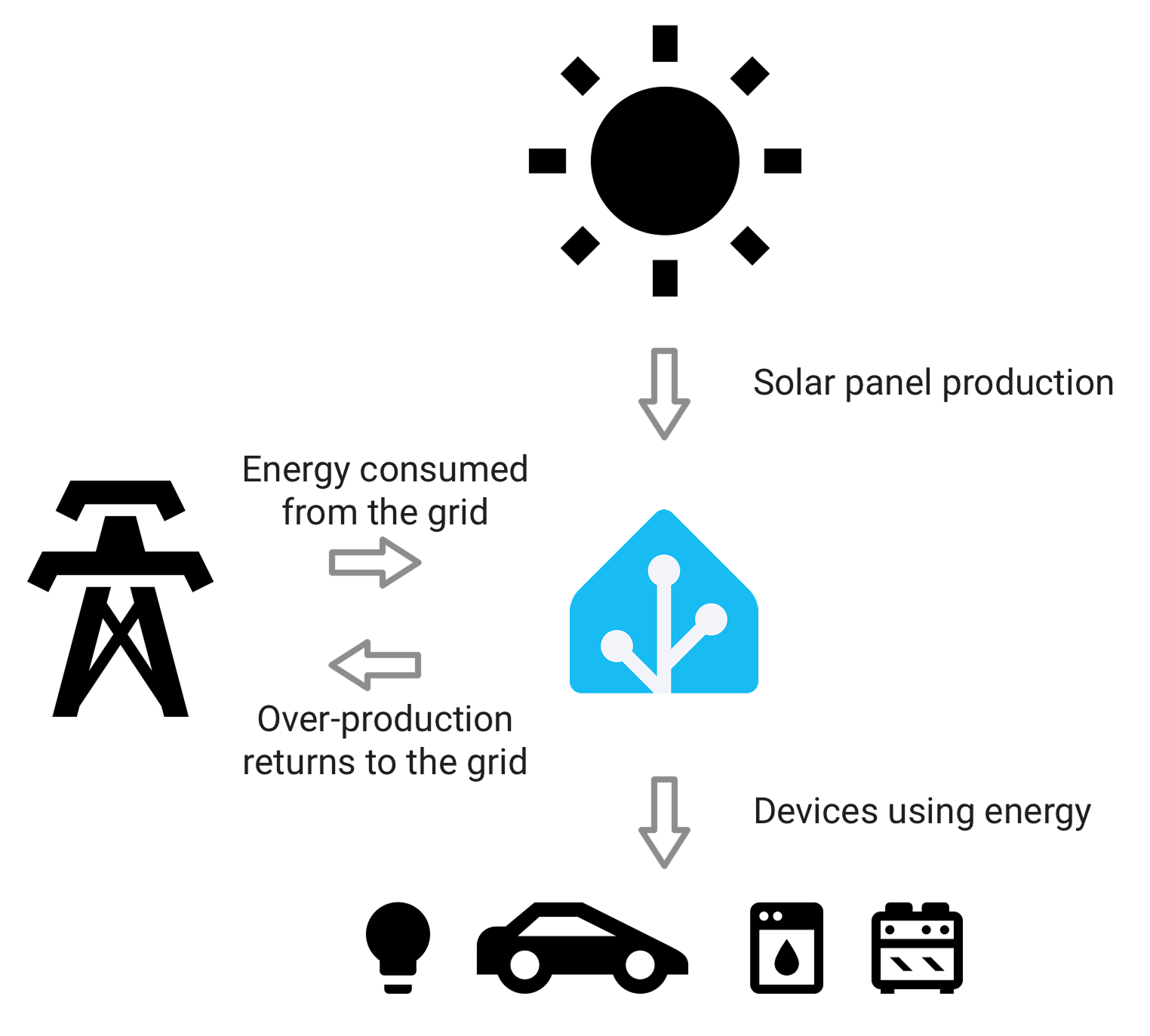
Home Assistant's energy model is a useful way to think about the problem: the dashboard only makes sense when grid, solar, battery, and load are measured as separate energy flows.
The short answer
For most homes, the strongest setup is:
- Keep the battery or inverter app for device status, firmware, warranty support, backup settings, and installer diagnostics.
- Add a reliable grid meter or CT-based monitor at the main service boundary so import and export are measured independently from the inverter.
- Use a shared dashboard layer, such as Home Assistant, IAMMETER Cloud, SolarAssistant, or another energy platform, when you need one view across solar, battery, grid, EV charging, and major loads.
- Avoid mixing unrelated totals. Battery charge, battery discharge, solar production, grid import, grid export, and home consumption should be separate values before they are combined into charts.
If your battery ecosystem already includes a smart panel or gateway, start there. Products such as EcoFlow DELTA Pro Ultra with Smart Home Panel 2, Tesla Powerwall, Enphase IQ Battery systems, and other integrated platforms can show useful energy flows inside their own app. But if your home also has third-party meters, a non-matching inverter, a separate EV charger, or Home Assistant automations, a second neutral monitoring layer often becomes the cleaner long-term answer.
What you actually need to see
A battery dashboard should answer practical questions, not just show a large battery icon.
The important values are:
| Data point | Why it matters | Common mistake |
|---|---|---|
| Solar production | Shows how much energy the PV system created | Treating inverter output as household self-consumption |
| Grid import | Shows how much energy came from the utility | Missing import during battery charging or backup recharge |
| Grid export | Shows surplus solar sent out | Assuming low export always means high self-consumption |
| Battery charge | Shows energy stored into the battery | Mixing charge with solar production and double-counting |
| Battery discharge | Shows energy delivered from the battery | Counting discharge as new generation |
| Household load | Shows what the home actually used | Estimating load from partial data instead of measuring it |
| State of charge | Shows remaining usable energy | Confusing percentage with kWh available for backup |
| Critical-load panel use | Shows backup-circuit demand during outage planning | Assuming whole-home use equals backed-up load |
The key idea is boundary clarity. A main grid meter sees what crosses the utility boundary. An inverter sees PV and sometimes battery power. A smart panel may see selected circuits. A plug monitor sees one appliance. These are not interchangeable measurements.
When the battery app is enough
A vendor app is often enough when the battery and solar system come from the same ecosystem, the installation is simple, and you mostly want to know whether backup power is ready.
This is the best fit when:
- Your battery, inverter, gateway, and consumption CTs were installed as one system.
- The app clearly shows solar, home load, grid import/export, and battery flow.
- You do not need local automations or custom tariff logic.
- You are not trying to merge third-party EV charger or sub-meter data.
- Your installer uses the same portal for support.
For example, Tesla's energy app is designed around a unified experience for Tesla solar and Powerwall products. Enphase's homeowner materials describe app-based visibility across solar, battery, EV charging, and consumption when the right CTs and gateway are installed. EcoFlow's Smart Home Panel 2 is positioned as the control point for DELTA Pro Ultra whole-home backup, circuit control, solar, generator, and energy-management workflows.
The limitation is not that vendor apps are bad. The limitation is that they usually explain the vendor ecosystem best. Once the home adds devices outside that ecosystem, you may need a more neutral dashboard.
When you need a separate meter
A separate meter or CT monitor is worth adding when the battery app cannot prove the grid boundary or when you need data that remains useful outside the battery vendor's cloud.
You should consider a dedicated meter when:
- Solar production looks right, but self-consumption or export numbers do not make sense.
- The battery charges from solar and grid, but the app does not clearly separate those sources.
- You have a hybrid inverter and want an independent check on grid import/export.
- You plan to add an EV charger, heat pump, hot water diverter, or time-of-use automation.
- You want Home Assistant, MQTT, Modbus, local APIs, or long-term data ownership.
- You need three-phase visibility rather than one blended household number.
A meter at the main service boundary is the most important one. It gives you the truth about the grid. From there, you can decide whether circuit-level monitoring is worth adding for the EV charger, hot water system, HVAC, or backed-up loads.
Do not add meters randomly. A good battery monitoring design usually starts with one accurate boundary meter, then adds circuit or device-level meters only where they answer a decision.
The best dashboard layer for different homes
There is no single best dashboard for every battery home. The right choice depends on whether you want simplicity, local control, advanced solar-battery visibility, or multi-site reporting.
Vendor app first
Use the vendor app first when your system is still under installer support or when the battery ecosystem already includes the meter, gateway, and backup panel. This keeps configuration, warranty support, and firmware workflows in the place your installer expects.
The vendor app should still be judged by the same standard: can it show solar, grid import, grid export, battery charge, battery discharge, and load without making you guess?
Home Assistant for local dashboards and automation
Home Assistant is the strongest option when you want a local-first energy dashboard that can combine multiple brands. Its energy documentation separates grid, solar, battery, gas, and individual device data, which is exactly the structure a mixed home energy system needs.
Home Assistant is a good fit when:
- You already use it for smart home automation.
- Your meter, inverter, battery, or charger has a reliable integration.
- You want local dashboards instead of only cloud apps.
- You want automations based on tariff, solar surplus, state of charge, or grid import.
The trade-off is setup quality. Home Assistant only looks clear if the underlying entities have the correct units, device class, state class, and direction. If you feed it cumulative energy, live power, charge, discharge, import, and export incorrectly, the dashboard can become beautifully wrong.
IAMMETER Cloud or IAMMETER Local for meter-led monitoring
IAMMETER is useful when the meter is the trustworthy source of solar and grid data, especially with single-phase or three-phase meters that can expose import/export and live power values. IAMMETER Cloud adds hosted dashboards, solar self-consumption views, tariff-style reporting, and multi-site monitoring. IAMMETER Local / Docker can keep the monitoring stack closer to the home while still accepting meter uploads.
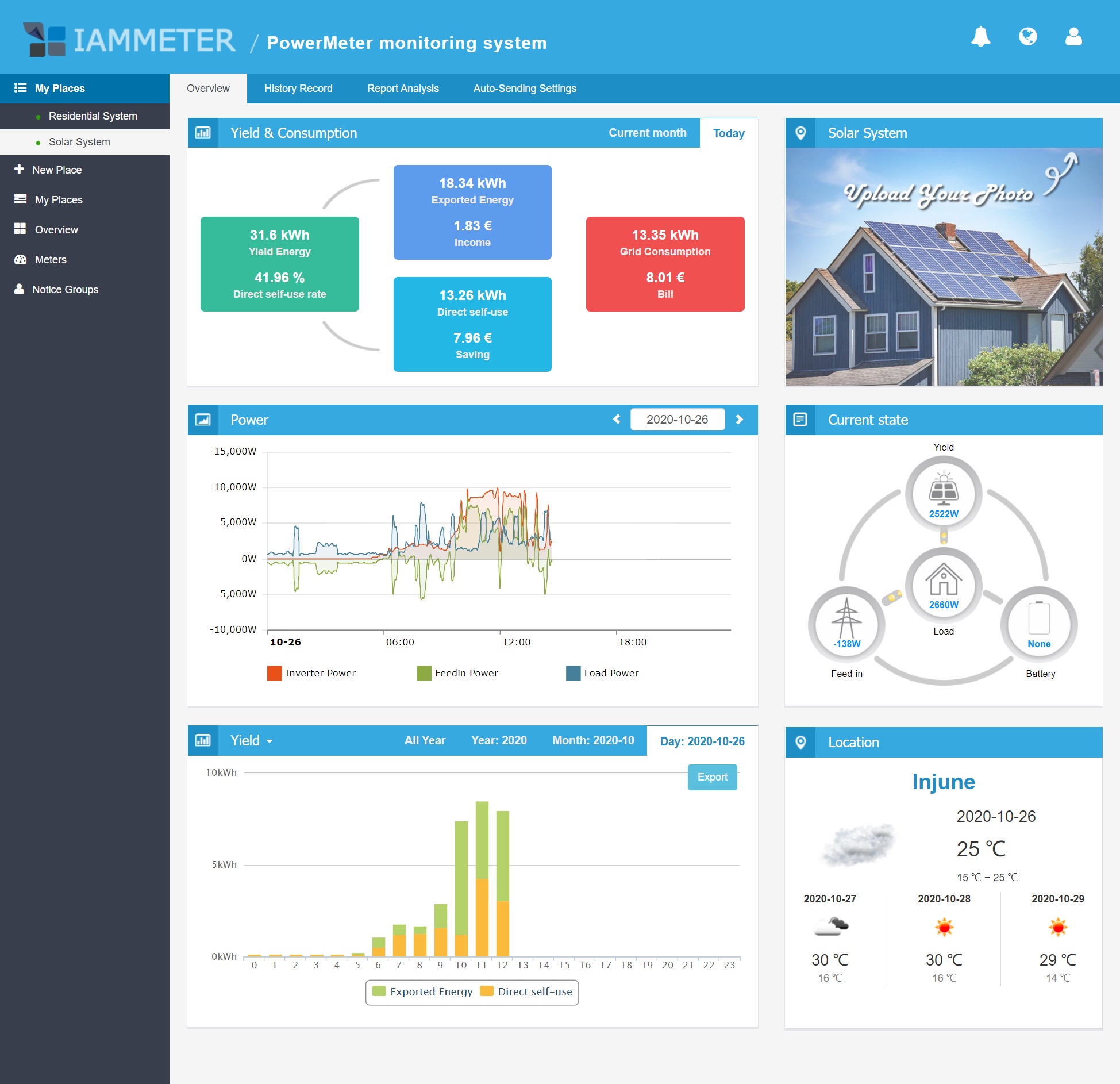
Meter-led platforms are strongest when the goal is to make solar yield, export, self-use, and load visible from a consistent measurement point.
IAMMETER is a good fit when:
- The home has a dedicated energy meter with import/export monitoring.
- You want solar self-consumption and billing-style reports without building every chart yourself.
- You need a path that can work with Home Assistant or custom data flows later.
- You prefer the meter to be the source of truth rather than the battery app.
SolarAssistant for inverter and battery-heavy systems
SolarAssistant is a good fit for technically confident owners who want fast local visibility into supported inverter and battery systems. It is often most useful where the inverter/battery ecosystem is the center of the installation and live local data matters more than polished consumer-app simplicity.
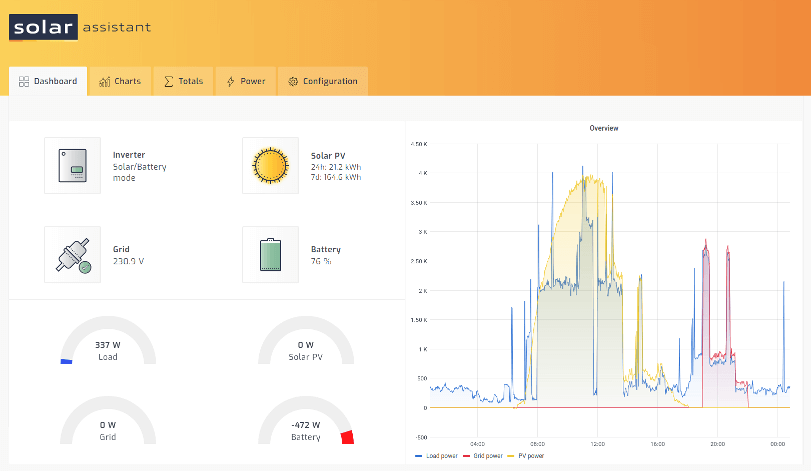
SolarAssistant is closer to an inverter-and-battery console than a generic household energy app, which can be valuable when live local system behavior matters.
It is a good fit when:
- Your inverter or battery is supported directly.
- You want local live data and MQTT-style downstream integration.
- You are comfortable maintaining a small local device such as a Raspberry Pi.
- You care more about technical visibility than consumer-app polish.
How to avoid double-counting
Battery systems are easy to double-count because energy can move through several paths in the same day.
A simple example:
- Solar produces 30 kWh.
- The home uses 18 kWh directly.
- The battery charges 8 kWh from solar.
- The grid receives 4 kWh export.
- Later, the battery discharges 6 kWh into the home.
The battery discharge is not new solar production. It is stored energy coming back out. If your dashboard adds solar production and battery discharge as if both are generation, the home will appear to have more energy than it actually produced.
Use these rules:
- Treat battery charge and battery discharge as storage flows, not production.
- Keep grid import and grid export as separate cumulative energy sensors.
- Use net grid power only for live direction, not for long-term import/export totals.
- Do not infer home load from partial data if a proper load value is available.
- On three-phase systems, confirm whether the dashboard uses per-phase values or a valid total.
- During backup operation, separate backed-up circuits from whole-home consumption where possible.
Battery monitoring before an outage
Backup planning is one of the most useful reasons to improve monitoring before you actually need it.
Look at your normal evening and overnight load. Then compare it with your backed-up circuits and battery usable capacity. A 10 kWh battery does not mean 10 kWh will be available for every appliance in the home. Reserve settings, inverter limits, battery age, weather, outage timing, and which circuits are backed up all matter.
Before storm season or planned outages, check:
- The battery's normal overnight discharge.
- The load of backed-up circuits only.
- Whether the battery can recharge from solar during an outage.
- Whether the inverter or smart panel limits high-power appliances.
- Whether the monitoring app clearly marks grid-down operation.
- Whether your dashboard still receives data if internet access fails.
This is where integrated backup systems and smart panels can be useful. A product such as EcoFlow DELTA Pro Ultra with Smart Home Panel 2 is designed around controlled backup circuits, app visibility, and energy-management features. But even then, an independent grid or load monitor can help if the home has other solar, EV, or sub-metered loads outside the panel's view.
What to buy first
If you are still planning the system, buy monitoring in this order:
- Make sure the battery or inverter package includes the correct gateway and consumption CTs.
- Add a main grid meter if import/export will otherwise be estimated or hidden.
- Add circuit monitoring only for loads that change decisions: EV charger, hot water, heat pump, HVAC, workshop, or backup panel.
- Choose a dashboard layer only after you know which devices provide reliable data.
- Prefer devices with documented local APIs, Modbus, MQTT, or supported integrations if long-term data ownership matters.
If you already have the battery installed, start by auditing the data you can see today. Write down whether the app shows solar production, grid import, grid export, home load, battery charge, battery discharge, state of charge, and backed-up load. The missing rows tell you what to fix next.
Practical setup examples
Simple integrated battery home
A Tesla Powerwall or Enphase IQ Battery system with installer-installed consumption monitoring may be enough for many owners. The app is the daily view, and Home Assistant is optional unless the owner wants automations, local dashboards, or data from non-matching devices.
Mixed solar and portable whole-home backup
A home with an existing solar inverter plus EcoFlow DELTA Pro Ultra and Smart Home Panel 2 may need two views: the EcoFlow app for backup panel and battery behavior, plus a main meter or Home Assistant dashboard for the broader home. This avoids assuming the backup panel sees every load or every solar data point.
Three-phase solar home with battery plans
A three-phase home should be careful about phase-level data. A meter such as IAMMETER WEM3080T, Eastron SDM630, Chint DTSU666, or another compatible three-phase meter can make grid import/export clearer, but the dashboard must understand whether values are per phase, totalized, or netted.
Home Assistant-first energy home
A Home Assistant-first user should choose meters and chargers with stable integrations before buying a battery. The battery system still needs its official app, but the daily dashboard can sit in Home Assistant once the energy sensors are configured correctly.
Final recommendation
Do not choose a battery monitoring setup by asking which app has the nicest chart. Ask which system gives you trustworthy boundaries.
The best setup shows where energy is produced, where it is stored, where it enters or leaves the grid, and where it is consumed. If one ecosystem can do that clearly, keep it simple. If the home is mixed-brand, three-phase, EV-ready, or automation-heavy, add a reliable main meter and a shared dashboard layer before the data becomes too tangled to trust.
A battery is a storage device, not a full energy monitoring strategy by itself. The monitoring strategy is what turns that battery from a black box into a useful part of the home energy system.
Sources
- EcoFlow DELTA Pro Ultra whole-home backup product page
- EcoFlow Smart Home Panel 2 product page
- Home Assistant energy management documentation
- Home Assistant battery integration documentation
- Home Assistant electricity grid integration documentation
- Enphase consumption CT product page
- Tesla App for Energy support page
- SolarAssistant official site