Shelly EM vs Emporia Vue 3: Which Home Energy Monitor Fits Your House Better?
Shelly EM Gen3 and Emporia Vue 3 both help homeowners see electricity use more clearly, but they are built for different kinds of homes.
Choose Shelly EM Gen3 if you want a compact, local-data-friendly monitor for one or two important circuits, a main single-phase feed, solar import/export visibility, or a Home Assistant setup that should keep working without depending heavily on a vendor cloud.
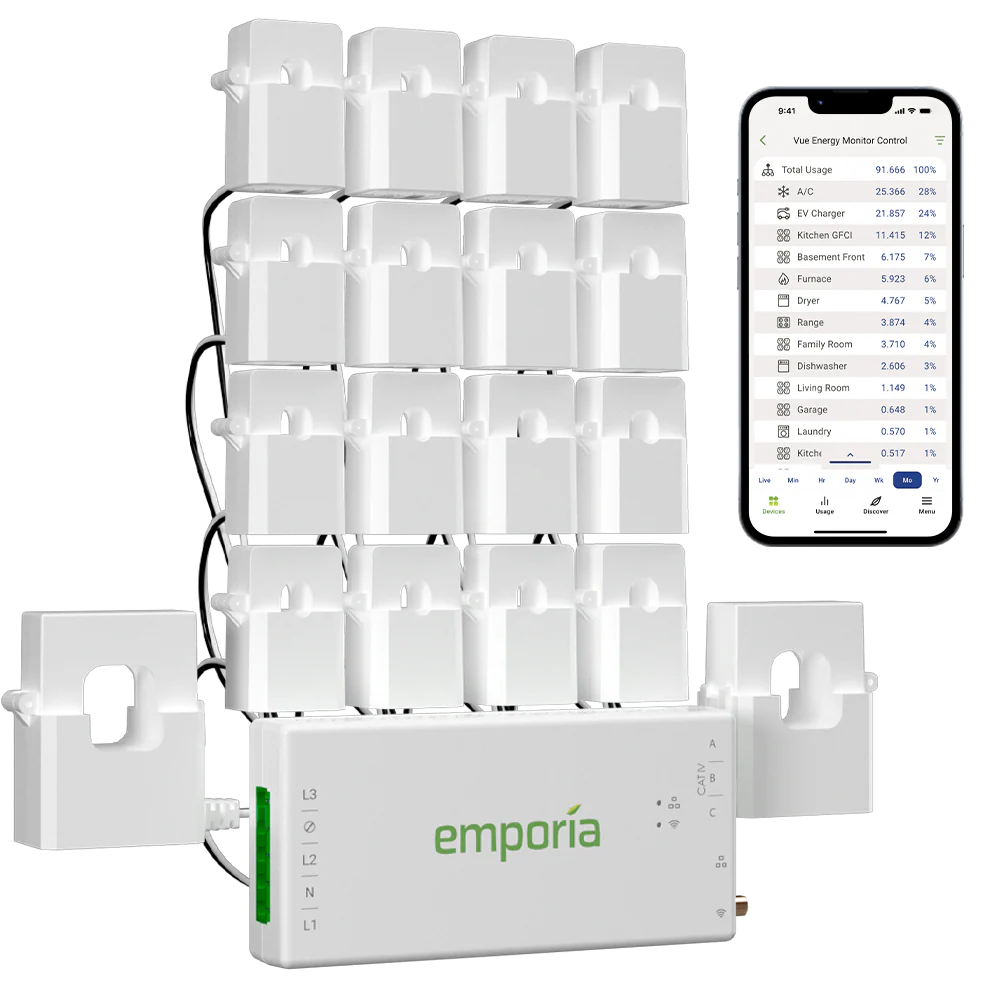
Choose Emporia Vue 3 if you want a more complete electrical-panel view with up to 16 branch circuits, a polished consumer app, alerts, solar/net metering support, and less interest in maintaining your own local energy stack.
The short version: Shelly EM is the better fit for local control and smaller monitoring jobs. Emporia Vue 3 is the better fit when circuit-level coverage matters more than local data ownership.
Quick Comparison
| Decision point | Shelly EM Gen3 | Emporia Vue 3 |
|---|---|---|
| Best fit | Local-first users, Home Assistant homes, one or two monitored loads | Whole-home and circuit-level monitoring from one panel |
| Monitoring channels | Up to 2 CT channels | Up to 3 x 200 A mains and up to 16 x 50 A branch circuits |
| Installation style | Compact retrofit device with CT clamps | Panel-installed monitor with multiple CT sensors |
| Local access | Strong: embedded web UI, MQTT, WebSocket, HTTP, RPC, scripting | Limited in the official setup: Emporia says Vue data flows through the cloud |
| Cloud dependency | Optional for many local use cases | Required for the official app experience and key features |
| Home Assistant fit | Strong official Home Assistant integration path for Shelly devices | Mostly cloud/community paths unless using unsupported firmware approaches |
| Solar monitoring | Good for single-phase import/export or one/two measured circuits | Good for solar/net metering and branch-level context in the Emporia app |
| Best buyer | Tinkerer, local-data user, targeted monitor buyer | Mainstream homeowner who wants circuit breakdowns in an app |
What Shelly EM Does Better
Shelly EM Gen3 is a compact two-channel CT energy meter. Its strength is not the number of circuits it can monitor. Its strength is that it behaves like a flexible building block in a smarter home energy stack.
Shelly's official product material lists support for scripting, webhooks, MQTT, WebSocket, HTTP, and RPC. The device also has an embedded web interface and can store local data logs on the device. That makes it attractive if your priority is access to live data, automation, and integration rather than a highly polished energy app.
This matters in real homes because energy monitoring often starts small. You may only need to know:
- how much the house is importing or exporting;
- whether a heat pump, hot water system, pool pump, or EV charger is using too much power;
- whether a solar circuit is flowing in the expected direction;
- whether Home Assistant can use the data for dashboards or automations.
For those jobs, two CT channels can be enough. A smaller monitor can also be easier to fit into cramped locations, especially when you are not trying to instrument every breaker in the panel.
What Emporia Vue 3 Does Better
Emporia Vue 3 is stronger when the main question is not "Can I get local data?" but "Which circuits are actually using the power?"
The official Emporia Vue 3 product page lists support for up to three 200 A mains CTs and up to sixteen 50 A branch-circuit CTs. That is a major advantage over a two-channel monitor if you want to compare heating, cooling, oven, dryer, EV charging, pool pump, solar AC output, workshop loads, and always-on circuits in one app.
For ordinary homeowners, that circuit map can be more useful than protocol flexibility. Instead of building a dashboard, you open the app and see where the load is going. Emporia also positions Vue 3 around alerts, real-time tracking, solar generation, net metering, and automation inside its own ecosystem.
The trade-off is data ownership. Emporia's own documentation says the Vue 3 requires an active internet connection for key features, including real-time monitoring, cloud storage, and automatic updates. Its developer-access documentation also says direct local access is not available on Vue energy monitors and that data flows through the Emporia cloud.
That does not make Vue 3 a bad product. It means the product is app-first and cloud-first. For many households, that is perfectly acceptable. For local-data buyers, it is the central drawback.
The Real Difference: Channel Count vs Data Access
The cleanest way to compare these two monitors is to avoid treating them as identical products.
Shelly EM is a targeted, integration-friendly meter. Emporia Vue 3 is a multi-circuit consumer monitoring system.
If you want broad panel coverage, Emporia is the more complete option. If you want a data source you can fold into your own stack, Shelly is usually the cleaner fit.
A good buying question is:
Do you want more measured circuits, or do you want more control over the data path?
If the answer is "more measured circuits," Vue 3 has the stronger hardware layout. If the answer is "more control over the data path," Shelly EM is easier to justify.
Home Assistant Buyers Should Be Careful
Home Assistant changes the decision quite a bit.
Shelly devices have a well-established Home Assistant integration path, and Shelly's local protocol support makes the EM Gen3 a natural fit for users who want fast local dashboards, automations, and energy entities.
Emporia Vue 3 is a different story. There are community projects and unofficial paths around Emporia data, and some technically confident users explore firmware replacement routes. But those are not the same as buying a device with a supported local API. If your household depends on Home Assistant as the primary energy dashboard, you should treat Emporia's official cloud dependency as a real design constraint.
For a Home Assistant-first home, Shelly EM is usually the safer choice if two channels are enough. If you need sixteen circuits, Emporia may still be worth considering, but you should be comfortable with the cloud-first trade-off before buying.
Solar Homes: Which One Fits Better?
Both products can help solar households, but in different ways.
Shelly EM works well when the solar monitoring job is simple and local: measure grid import/export, measure a solar AC circuit, or expose a compact set of energy values into Home Assistant. It can be a good fit when the inverter app already covers generation and you only need an independent meter for the missing side of the picture.
Emporia Vue 3 works better when you want solar in the context of the whole panel. For example, you may want to know whether midday solar is going into an EV charger, a water heater, air conditioning, or general household load. With enough branch CTs installed, Vue can make that pattern easier for a non-technical user to see.
The catch is the same as above: Emporia gives you broader circuit visibility through its app, while Shelly gives you a more open path into your own monitoring system.
Installation and Panel Fit
Neither product should be treated as a casual plug-in gadget. Both involve current transformers inside or around electrical-panel wiring, and installation should follow local electrical rules.
Shelly EM Gen3 is physically compact and designed for retrofit use with up to two CTs. That can make it attractive when panel space is limited or the monitoring goal is narrow.
Emporia Vue 3 uses more sensors and gives more circuit detail, but that also means more wiring, more CT placement decisions, and more panel-space planning. A full 16-circuit install can produce excellent data, but it is also easier to make mistakes with CT orientation, phase mapping, circuit naming, or multi-pole loads.
Before buying either system, check:
- whether your panel has enough physical space;
- whether the CT clamps fit around the conductors you want to monitor;
- whether your home is single-phase, split-phase, or three-phase;
- whether you need solar import/export, individual circuit monitoring, or both;
- whether your installer is comfortable with the product and local code requirements.
Which One Should You Buy?
Buy Shelly EM Gen3 if:
- you mainly need one or two measured channels;
- you care about local data access;
- you use Home Assistant, MQTT, HTTP, WebSocket, or custom dashboards;
- you want a compact retrofit meter rather than a full circuit-monitoring kit;
- you are comfortable building or maintaining part of the monitoring experience yourself.
Buy Emporia Vue 3 if:
- you want to see many circuits in one consumer app;
- you care more about practical circuit breakdowns than local APIs;
- you want a relatively complete panel-level monitoring kit;
- you are comfortable with cloud-based monitoring;
- you want alerts, app history, and solar/net-metering context without building your own stack.
Avoid Shelly EM Gen3 if you expect one device to explain every major circuit in your home. Two channels are useful, but they are not a replacement for full panel monitoring.
Avoid Emporia Vue 3 if local data ownership is a hard requirement. Official Emporia documentation is clear that the standard Vue experience depends on cloud connectivity.
Practical Recommendation
For most technically curious EnergyMeterHub readers, the decision comes down to the monitoring architecture you want to live with over the next few years.
If you are building a local, Home Assistant-centered energy setup, start with Shelly EM when the channel count fits. It is simpler to integrate, easier to automate locally, and better aligned with local-data expectations.
If your goal is to understand household energy use room by room or appliance by appliance without building a custom stack, Emporia Vue 3 is the more informative system. It gives you a broader picture of the panel, especially when the 16-sensor kit is installed cleanly and labeled well.
The best answer is not "Shelly is better" or "Emporia is better." The better answer is: Shelly EM is better as an open monitoring component; Emporia Vue 3 is better as a circuit-level consumer monitoring system.
Source Notes
Key product and technical details were checked against the official Shelly EM Gen3 product/documentation pages, the official Home Assistant Shelly integration documentation, the official Emporia Vue 3 product page, and Emporia's developer-access and cloud-connectivity documentation. Exact installation requirements, supported systems, CT counts, and app behavior can vary by region and product bundle, so confirm the current product page and local electrical requirements before purchase.