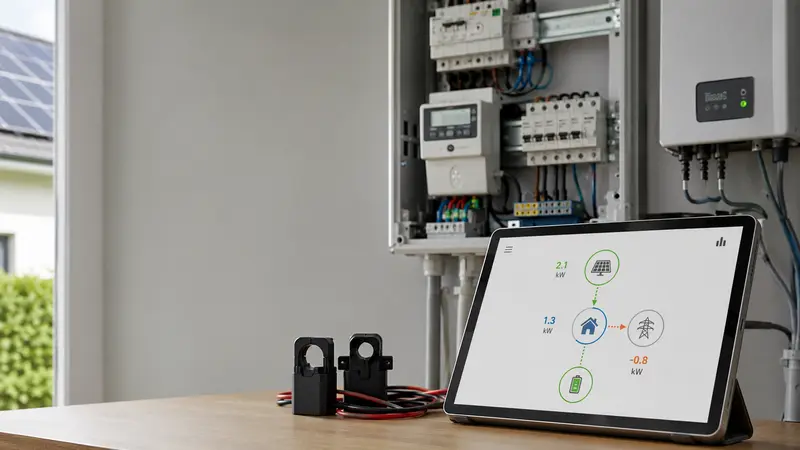
A negative power reading is not automatically bad news. In many energy dashboards, a negative watt value simply means power is flowing in the opposite direction from the direction the system has chosen as positive.
That sounds abstract, but the practical meaning is simple: your monitor may show -1.8 kW because your solar system is exporting to the grid, because a battery is discharging, because a CT clamp is facing the wrong way, or because the dashboard has been configured with the opposite sign convention.
The number is only useful once you know what the meter is measuring, where it is installed, and which direction the software treats as positive.
The short version
- Negative power usually means reverse flow relative to the meter's configured direction.
- On a grid meter, negative often means export, while positive often means import.
- On a solar CT, negative may mean the clamp is reversed or the app expects the opposite orientation.
- On a battery channel, negative may mean discharge in one system and charge in another.
- The sign is less important than whether the value changes logically with real system behavior.
- Do not flip CT clamps or change software signs until you know which measurement point you are looking at.
If your bigger question is why solar production and grid export do not match, read Why Solar Production and Export Do Not Match in 2026. This article focuses specifically on the plus/minus sign problem.
Why negative power exists at all
Electricity monitoring is directional. A meter does not only estimate how much current is flowing; it also tries to understand which way energy is moving.
For a simple import-only house, this is easy. Power comes from the grid into the home, so the monitor shows a positive load.
Solar changes that picture. During the day, the house may be using some solar locally while the leftover power flows out to the grid. From the grid connection point, that export is the opposite direction from normal import.
So the same meter may need to represent two directions:
| Flow at the grid connection | Common display convention | What it usually means |
|---|---|---|
| Grid to home | Positive power | Importing from the grid |
| Home to grid | Negative power | Exporting surplus solar |
| Battery to home | Often negative or discharge, depending on system | Battery is supplying load |
| Home or solar to battery | Often positive or charge, depending on system | Battery is charging |
The difficult part is that not every product uses the same convention. One app may show export as negative. Another may show export as a positive value in a separate "export" field. Home Assistant, inverter apps, smart meters, and CT-based monitors may all label the same physical flow differently.
First question: where is the meter installed?
Before interpreting a negative number, identify the measurement point.
A negative value on the main grid connection does not mean the same thing as a negative value on the solar inverter circuit, battery circuit, EV charger circuit, or a sub-board feeder.
For example:
- Main grid CT showing
-2.4 kWat noon: probably solar export. - Solar inverter CT showing
-2.4 kWat noon: possibly reversed CT direction or an inverted configuration. - Battery CT showing
-2.4 kWin the evening: may mean battery discharge. - EV charger circuit showing negative power: usually suspicious unless the charger supports vehicle-to-home or the CT is assigned incorrectly.
This is why a wiring diagram or installer note is often more useful than another screenshot. The same number can be normal or wrong depending on where it was measured.
For a broader explanation of meter roles, see Smart Meter vs Inverter Meter vs Clamp Monitor in 2026.
Negative power on the grid connection
On a grid import/export meter, negative power is often completely normal for solar homes.
A typical daytime sequence might look like this:
| Time | Solar production | Home load | Grid reading | Meaning |
|---|---|---|---|---|
| 7:00 am | 0.4 kW | 1.2 kW | +0.8 kW | Importing from grid |
| 12:30 pm | 5.0 kW | 1.8 kW | -3.2 kW | Exporting surplus solar |
| 6:30 pm | 0.0 kW | 2.1 kW | +2.1 kW | Importing from grid |
In this convention, the sign is doing useful work. Positive means the grid is supplying the house. Negative means the house is pushing surplus energy back to the grid.
Some dashboards hide this by splitting the values into separate import and export cards. Others show a single net-power value that crosses through zero. Both approaches can be correct.
Negative power on a solar inverter circuit
A solar production circuit usually has a more obvious expected direction: from the inverter into the switchboard.
If a monitor shows negative solar production during full sun, check the setup before assuming the inverter is faulty.
Common causes include:
- the CT clamp is facing the opposite direction,
- the measured conductor is not the intended inverter output conductor,
- the phase mapping is wrong on a multi-phase system,
- the dashboard expects generation to be entered as negative,
- or the channel has been assigned as grid import/export instead of solar production.
A reversed CT is one of the most common causes. Many clamps have an arrow or label showing the intended direction of current flow. If that arrow is opposite the software's expectation, the graph may look upside down.
Do not fix this blindly. Some systems want the CT arrow toward the load, some toward the grid, and some let you invert the sign in software. Check the device manual or installer convention before moving hardware.
Negative power on a battery channel
Battery readings are especially confusing because charge and discharge are both normal.
One system may define battery charging as positive and discharging as negative. Another may do the opposite. A third may avoid signed values and show separate charge and discharge cards.
What matters is whether the sign matches the real state of charge.
Use this check:
| Battery behavior | What the reading should do |
|---|---|
| State of charge is rising in midday sun | Reading should indicate charging |
| State of charge is falling during evening load | Reading should indicate discharging |
| Battery is idle | Reading should sit near zero |
| Battery is full and solar is still strong | Grid export may increase instead |
If the dashboard says the battery is discharging while the state of charge is clearly rising, the sign convention or channel mapping may be wrong.
This matters because incorrect battery signs can break self-consumption charts, savings estimates, and automation rules. A dashboard can look polished while still adding charge and discharge in the wrong direction.
Negative power on a circuit monitor
Circuit-level monitors are useful because they can show EV charging, hot water, heat pumps, pool pumps, or sub-board demand separately. But most normal loads should not appear as negative power.
If an EV charger, oven, hot-water circuit, or heat pump shows sustained negative consumption, check:
- whether the CT clamp is reversed,
- whether the clamp is on the wrong conductor,
- whether the circuit shares conductors in a way the monitor cannot interpret,
- whether a multi-pole circuit is being measured with only one CT,
- and whether the channel has been assigned to the wrong device in software.
A short dip around zero may be noise or a sampling artifact. A stable negative value on a normal load circuit deserves a closer look.
For CT-specific mistakes, see How to Avoid the Most Common CT Clamp Mistakes in Home Energy Monitoring.
Three-phase systems need extra care
Negative readings are harder to interpret on three-phase homes because import and export can happen on different phases at the same time.
For example, phase A may be exporting solar while phase B imports for a large load. Depending on the meter and netting method, the dashboard may show:
- per-phase positive and negative values,
- one total net value,
- separate import and export totals,
- or a confusing mix of all three.
If the total looks reasonable but one phase looks inverted, the issue may be phase mapping rather than a real power-flow problem. If every phase is reversed, the sign convention may be wrong globally.
This is also where voltage reference matters. Some meters need the voltage input and CT input to match the same phase. If CTs are clipped around one phase but voltage is referenced to another, the power sign and power factor can become misleading.
A practical diagnostic sequence
Use this order before changing anything.
1. Identify the measurement point
Write down whether the value is for grid, solar, battery, EV charger, hot water, or another circuit. A negative value cannot be interpreted without this context.
2. Compare the value with real behavior
At midday, a grid meter may go negative if solar exceeds household load. In the evening, the grid meter should usually return positive unless a battery is discharging or another export source exists.
3. Check whether the dashboard uses net power or split import/export
A single net-power card may show negative export. Separate import and export cards may never show negative numbers because the app has already separated the directions.
4. Check CT direction and channel assignment
If a solar or load circuit is upside down, inspect CT orientation and software channel assignment. Do not assume the physical clamp is wrong before checking whether the app has an invert option.
5. Check phase mapping
On three-phase systems, confirm that each CT belongs to the correct voltage phase and circuit label. A phase mismatch can create wrong signs even when the clamp is physically closed and reading current.
6. Check energy totals, not only live power
Live watts can jump around. Daily import, export, production, charge, and discharge totals usually reveal whether the sign is consistently wrong.
What a correct negative reading looks like
A correct negative reading usually passes the common-sense test.
If the sun is strong, house load is low, and the grid meter shows negative power, that is probably export.
If the sun sets, solar production falls to zero, and the grid meter moves positive again, the sign is behaving logically.
If a battery starts discharging at the evening peak and the grid import drops, the battery sign and grid sign should move in a way that agrees with the state of charge.
The more the signs match real-world behavior, the less you need to worry about the minus symbol itself.
When negative power is a warning sign
Investigate further if you see any of these patterns:
- solar production is always negative even when the inverter is generating,
- a normal load circuit is negative for long periods,
- import/export appears reversed on the utility boundary,
- battery charge and discharge are swapped,
- one phase behaves opposite to the others without a clear reason,
- energy totals become impossible, such as negative daily consumption,
- or the problem started immediately after electrical work, CT changes, inverter replacement, or dashboard migration.
In those cases, the likely issue is not the word "negative" itself. It is measurement direction, channel mapping, phase reference, or dashboard interpretation.
Bottom line
Negative power is a direction, not a diagnosis.
On a grid connection, it often means your solar system is exporting. On a battery channel, it may mean charge or discharge depending on the product. On a normal load circuit, it is more likely to suggest reversed CT direction or incorrect setup.
The safest way to interpret the value is to start with the measurement point, compare it with real system behavior, and only then decide whether the sign needs to be inverted.
If the reading makes physical sense, the minus sign may be doing exactly what it should. If it does not, check CT direction, channel assignment, phase mapping, and dashboard sign conventions before replacing hardware or blaming the inverter.