IAMMETER Cloud Review: What It Does Well for Solar Monitoring, Billing, and Multi-Site Tracking
Some energy platforms are good at graphs. Some are good at raw data. IAMMETER Cloud is more useful than that narrow description suggests, because it sits in the middle: it is still simple enough for a homeowner, but it already has a few features that matter to installers, landlords, or anyone managing more than one monitored site.
The question is not whether IAMMETER Cloud can show power readings. It can. The better question is whether it gives you enough context to act on those readings.
In the areas that matter most to normal users, the answer is often yes:
- tariff-aware billing instead of plain kWh totals,
- solar self-consumption and export visibility,
- alerting when data disappears or thresholds are crossed,
- and a
Virtual Sitelayer that is far more useful than most brand portals once you have more than one place to watch.

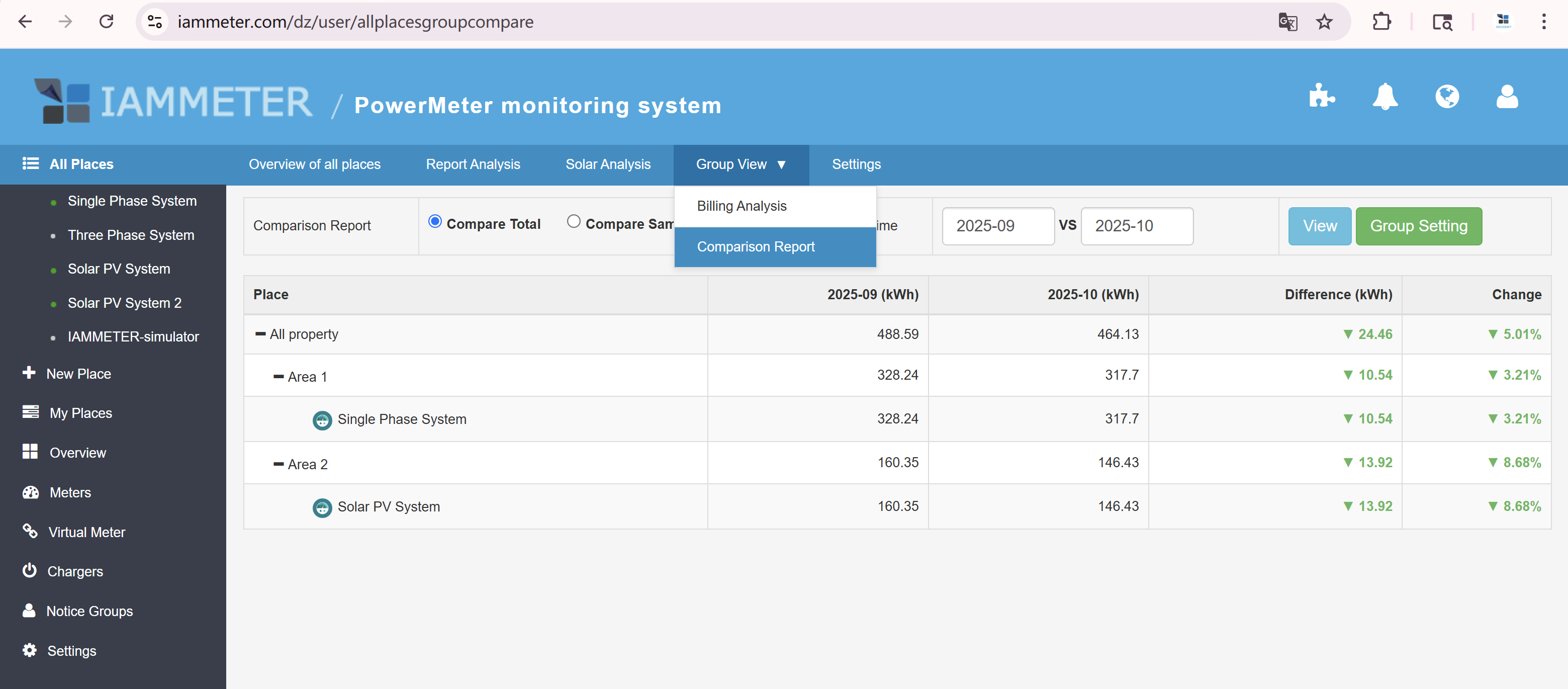
Official IAMMETER Cloud screenshot from the Virtual Site monthly comparison feature. This is the kind of view that turns a simple monitoring platform into a management tool.
What IAMMETER Cloud is actually good at
| If this is your question | IAMMETER Cloud does a good job when it can show | Why it matters |
|---|---|---|
| "Why is the bill still high?" | Tariff-based billing, income, and savings reports | You can connect behavior to cost instead of staring at total energy alone |
| "Is the solar helping, or am I still importing too much?" | Generation, self-use, export, import, and solar income | Better for judging whether midday solar is really offsetting consumption |
| "Did a site quietly stop uploading?" | Alerts, offline detection, and email workflows | Small fault, lost Wi-Fi, or dead meter problems show up faster |
| "Can I compare multiple sites without opening each one?" | Virtual Site tree structure and group reporting | Useful for workshops, rentals, branch offices, or multiple PV systems |
| "Can I automate around energy events?" | Webhook and MQTT in Pro | More practical than manual checking if you already use a smart home stack |
That is the main reason IAMMETER Cloud deserves a closer look. It is not just a viewer for one meter.
The part homeowners usually care about most: money, not charts
IAMMETER's official Cloud Pro page leans heavily into billing, income, and savings reporting, and that is sensible. Most homeowners do not wake up wanting another dashboard. They want to know whether the solar system is lowering the bill enough to justify the hardware sitting in the switchboard.
On the official feature page, IAMMETER Cloud Pro lists:
- fixed, tiered, and time-of-use tariff support,
- billing and income reports,
- total savings reports,
- electricity bill forecasting,
- and EV charging workflows around solar surplus.
That is a much stronger pitch than "you can see a line graph on your phone."

The quick-view billing screen is one of the more useful parts of IAMMETER Cloud. It is easier to understand than a raw history table when the real question is cost.
Basic vs Pro: the difference is bigger than it sounds
IAMMETER's official comparison page for IAMMETER-Cloud Basic and IAMMETER-Cloud Pro, published on April 29, 2025, makes one thing very clear: the gap is not a cosmetic upgrade.
| Feature area | Basic | Pro | What it means in practice |
|---|---|---|---|
| Upload frequency | 5 minutes | 1 minute | Pro is better at showing shorter load changes and faster site behavior |
| Real-time data storage | 1 month | 6 months | Pro keeps more recent high-resolution history available |
| Energy data retention | 1 month | Unlimited | Pro is much better for seasonal or year-over-year analysis |
| Bill data retention | 1 month | Unlimited | Pro is better if you want to track tariffs and bills over time |
| Monthly bill forecast | No | Yes | Useful when you want to see the likely bill before the retailer does |
| Multi-month bill report | No | Yes | Better for judging whether behavior changes are working |
| Battery simulation and billing analysis | No | Yes | Relevant if you are considering storage economics |
| Hourly energy analysis | No | Yes | Helpful for peak usage and time-of-use decisions |
| Abnormal data analysis | No | Yes | Better for cleanup and fault diagnosis |
| Email, Webhook, MQTT in Auto Sending | No | Yes | Pro is the version that fits alerting and automation use cases |
The same IAMMETER release note says Basic is exclusive to WEM3050T, while WEM3080, WEM3080T, WEM3080TD, and WEM3046T continue to include Pro by default. That matters at buying time, because the platform tier is partly tied to the hardware decision.
Virtual Site is where IAMMETER Cloud starts to separate itself
For a single house, most cloud dashboards feel similar. The more interesting part of IAMMETER Cloud starts when you use Virtual Site.
According to IAMMETER's official Virtual Site documentation, the feature can:
- combine multiple Places into one parent structure,
- aggregate energy, billing, and solar data across the tree,
- show hourly, daily, monthly, and yearly views,
- export CSV or Excel data,
- and expose aggregated data through the IAMMETER Cloud API.
IAMMETER also added a Monthly Comparison Report to Virtual Site. On the official example page, the system compares September 2025 and October 2025, where total energy use drops from 488.59 kWh to 464.13 kWh, a 5.01% reduction. That is the sort of comparison that is genuinely useful if you are trying to verify whether a tariff change, load shift, or operating change actually helped.

The solar overview page is the better starting point for homeowners. It shows self-use, export, and load on one screen instead of scattering them across separate menus.
Alerts are more concrete than many vendor platforms
IAMMETER's alert documentation is more specific than the usual "supports notifications" line.
As of April 1, 2026, the official guide says:
- offline alerts can trigger when no data has been uploaded for more than 10 minutes,
- level-trigger alerts have a minimum interval of 30 minutes,
- edge-trigger alerts have a minimum interval of 1 minute,
- email alerts are handled through notice groups,
- and alert data can also be sent outward through Webhook or MQTT.
That is not enterprise-grade alarm engineering, but it is enough to cover many real-world monitoring jobs:
- warning that a site has gone dark,
- warning that power or current crossed a threshold,
- kicking off a webhook into another system,
- or using MQTT to trigger a socket or automation when export power is high enough.
Where IAMMETER Cloud fits best
IAMMETER Cloud is a good fit if you want:
- a hosted platform rather than a self-hosted Docker service,
- better billing and savings analysis than a basic inverter app,
- solar import/export context rather than generation alone,
- one dashboard for more than one site,
- or a path to alerts and automation without building a backend first.
It is a weaker fit if your first priority is keeping every byte of data on your own hardware, or if you already have a polished local stack and mostly need a raw feed.
Where it is not magic
A fair review should say this plainly: IAMMETER Cloud is still a vendor platform.
If you want:
- full local ownership,
- custom retention policies,
- direct LAN-only operation,
- or deep control over the whole data pipeline,
then IAMMETER Local or another self-hosted path will make more sense.
That does not make IAMMETER Cloud weak. It just means it solves a different problem.
Bottom line
IAMMETER Cloud is strongest when the job is not just "show me a meter reading" but "help me understand what the site is costing, earning, and wasting."
That is why it works better for real households and small multi-site users than many lightweight cloud portals. The billing layer is useful. The Virtual Site layer is more useful than it first sounds. And the alerting hooks make it practical for people who want more than passive charts.
If you want the self-hosted side of the story, the next read should be:
- IAMMETER-Docker on Raspberry Pi: A Practical Guide to Local Energy Monitoring
- IAMMETER Local integration page