If you want to monitor a home EV charger properly, the first question is not which app looks nicest. It is what you actually need to know.
Some households only want session history, charging cost, and reminders to plug in. Some want to know how much the charger adds to the monthly bill. Others want to see whether charging is soaking up solar, pushing the house into peak imports, or forcing a service-capacity compromise.
Those are different monitoring jobs. The mistake is expecting one screen to answer all of them.
The good news is that most homes do not need a full electrical rebuild just to gain useful charger visibility. In many cases, the right answer is one of these:
- keep the charger's own app for sessions and scheduling
- add a circuit-level meter on the EV charger branch
- add a panel monitor if you also care about whole-home load, solar, or electrical headroom
- feed the data into a broader platform only if you need cross-system visibility or automation
The short version
If you only care about charging sessions, schedules, and rough cost estimates, the charger's own app may be enough.
If you care about how much energy the charger circuit actually uses over time, add circuit-level metering.
If you care about whether charging is increasing grid imports, colliding with other heavy loads, or using excess solar well, you need whole-home context as well, not just charger-only data.
And if you want to do things like solar-aware charging, dynamic load management, or mixed-device dashboards, it is usually better to think in terms of a measurement architecture rather than a charger feature list.
What the charger's own app is good at
A modern charger app can already be quite useful.
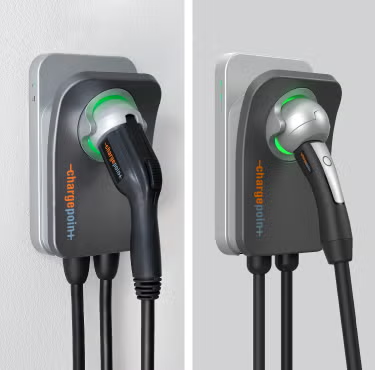
ChargePoint positions Home Flex around app-based home charging control, scheduling, and cost tracking. Emporia does something similar with schedule control, real-time charge-rate adjustment, and charging history inside its app workflow.
That means a charger app is often enough when your real questions are:
- Did the car charge last night?
- How many kWh did a session use?
- What did home charging cost this week?
- Can I keep charging in cheaper tariff windows?
- Can I limit or adjust charging rate?
For households that only want charging operations visibility, this is a perfectly reasonable stopping point.
What the charger app usually does not tell you
A charger app usually sees the charger well, but it does not necessarily explain the house around it.
That is where people get disappointed. The app may show a clean charging session, but still not answer:
- whether that charging came mostly from solar or from the grid
- whether the house was already heavily loaded at the same time
- whether EV charging is the main reason evening imports spiked
- whether another large load is masking the charger's real effect on bills
- whether total house demand is approaching the panel's comfortable limit
This is the gap between charger monitoring and energy-system monitoring.
When a circuit-level meter is the right next step
If your main question is "how much electricity does the EV charger circuit really use?" then a circuit-level meter is usually the cleanest next move.
This approach makes sense when:
- the whole-home picture is already good enough
- you mainly want the charger separated from other household loads
- you want long-term kWh tracking that is independent of the charger's own app
- you want a data path that can later feed dashboards or automation
A device such as Shelly EM fits this kind of job well when the goal is focused monitoring of one or two circuits rather than a full-panel monitoring build.
This is also often the least disruptive path. You are not rebuilding the house. You are adding visibility to the branch that matters.
When a panel monitor makes more sense than a charger-only meter
A panel monitor becomes the better answer when the charger is only part of the decision.
That is usually true when any of these apply:
- you have solar and want to know whether charging is using surplus generation or increasing imports
- you are trying to avoid an expensive service upgrade
- you want to compare the charger against other major loads like HVAC or hot water
- you want a whole-home baseline before adding more branch-level hardware
- you expect the house to add more electrified loads later
This is exactly the kind of scenario Emporia describes with PowerSmart. Its current documentation says PowerSmart works with an Emporia EV Charger and a Vue Energy Monitor installed in the electrical panel so the system can watch the home's total usage and adjust charging accordingly.
That is an important clue for buyers: once you care about charger behavior relative to the rest of the house, charger-only monitoring stops being enough.
A panel monitor such as Emporia Vue 3 can therefore be the smarter buy when your real goal is not just "see charging" but "understand charging inside the home's overall load pattern."
Solar homes need a different monitoring answer
For a solar home, EV charging is not just a transportation load. It is also a timing and self-consumption question.
If the charger app says the car used 12 kWh, that is helpful. But it still does not tell you whether:
- those 12 kWh came mostly from exported solar that would otherwise be lost cheaply
- they landed during expensive evening imports
- the battery was charging at the same time
- the home was already carrying a large air-conditioning or water-heating load
That is why a solar household often needs at least two layers of visibility:
- the charger or circuit itself
- the whole-home and grid boundary
If you want to carry that further into one combined view, Home Assistant is useful because its energy model supports both individual devices and device hierarchies. The official documentation explicitly warns that upstream relationships matter if you want to avoid double-counting a circuit and the devices beneath it.
That matters for EV charging because many advanced setups eventually want to compare:
- total home consumption
- EV charging consumption
- solar generation
- battery charge and discharge
- import and export behavior
Without a clean hierarchy, those numbers can look detailed while still being structurally wrong.
Four practical monitoring paths
Path 1: Charger app only
Best for:
- households that mainly want charging history and schedules
- drivers without solar who are not trying to optimize the whole house
- people who want the least complexity
Main limitation:
- poor whole-home context
Path 2: Charger app plus circuit-level meter
Best for:
- households that want trustworthy long-term charger energy tracking
- readers who want cleaner data than a charger app alone
- homes that do not yet need full-panel monitoring
Main limitation:
- still weak on import, export, and total-house interaction
Path 3: Panel monitor plus charger app
Best for:
- solar homes
- homes with limited service headroom
- households comparing EV charging against total load behavior
- buyers who may later want branch CTs or more detailed load visibility
Main limitation:
- more panel-side installation work than a charger-only path
Path 4: Panel monitor or circuit meter plus broader software platform
Best for:
- advanced monitoring users
- multi-load optimization
- mixed-brand homes that want one dashboard and automation path
Main limitation:
- more setup and data-model discipline required
How to avoid overbuilding the solution
A lot of people jump too quickly from "I want to monitor my charger" to "I need a whole new electrical architecture."
Usually you do not.
A calmer way to decide is to ask these five questions:
1. Do I need charger-session visibility or energy-system visibility?
If the answer is charger-session visibility, stay simple. If it is energy-system visibility, the charger app alone is not enough.
2. Do I already trust my whole-home numbers?
If you do not, a branch-only EV view can still leave you guessing about bills, solar, and peak demand.
3. Am I trying to solve a solar problem, a cost problem, or a capacity problem?
Each one points to a different measurement layer.
- solar problem: whole-home plus charger context
- cost problem: charger energy totals plus tariff timing
- capacity problem: total-house monitoring matters more than charger-only history
4. Will I want the data somewhere besides the vendor app later?
If yes, choose a monitoring path with a cleaner expansion story now instead of creating a dead end.
5. Which upgrade would actually change what I do next?
That is the only upgrade worth paying for.
Common mistakes
Treating charger session data as if it explains the whole house
It does not. It explains the charger.
Buying a circuit meter when the real question is service capacity
If the real issue is whether the charger collides with total-home load, you need the house boundary too.
Buying a panel monitor when the only real question is monthly charger usage
That can be overkill if you truly do not care about solar, imports, or headroom.
Ignoring data structure in a mixed dashboard
If a charger, its parent circuit, and total house consumption are not modeled properly, the dashboard can overstate usage.
Thinking "no rebuild" means "no installation judgment"
Even relatively light-touch monitoring still depends on correct CT placement, phase matching where relevant, and safe electrical work.
Recommended starting points
If you want the simplest practical answer:
- no solar, no headroom worries: start with the charger app
- need independent charger energy totals: add a circuit-level meter
- solar home or limited panel headroom: start with whole-home monitoring and then add charger detail if needed
- advanced mixed-system visibility: plan the hierarchy before buying more sensors
Bottom line
The best way to monitor a home EV charger without rebuilding your whole electrical setup is usually not to rebuild anything first. It is to choose the smallest monitoring layer that answers the real question.
For some homes, the charger app is enough. For many, the next step is a circuit-level meter. For solar homes and homes close to service limits, a panel monitor is often the more useful upgrade because it explains how EV charging behaves inside the rest of the house.
In other words, proper EV charger monitoring is less about adding maximum hardware and more about choosing the right measurement boundary.
Related reading
- EV Charger Selector
- EV Charging Window Calculator
- Main Meter vs Circuit Meter for Solar Homes: Which One Do You Actually Need?
- How to Add Consumption Monitoring to a Solar Home That Only Has Inverter Data
Sources
- ChargePoint Home Flex home page
- ChargePoint general home FAQs
- ChargePoint Home Flex installation FAQ
- Emporia Pro EV Charger official store page
- Emporia PowerSmart overview
- Emporia PowerSmart settings and configuration
- Home Assistant: Understanding home energy management
- Home Assistant: Integrating individual device energy usage
- Shelly EM device page on EnergyMeterHub
- Emporia Vue 3 device page on EnergyMeterHub
- Home Assistant integration page on EnergyMeterHub