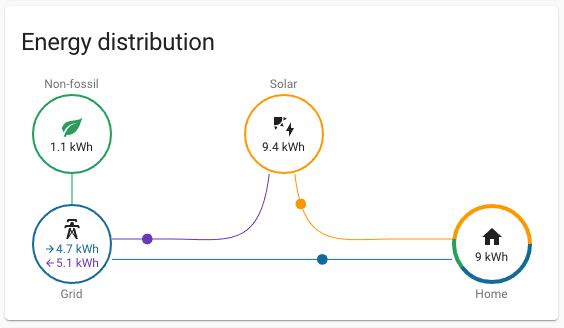
If your solar setup only tells you how much the inverter produced, you still do not know the number that usually matters most in day-to-day operation: how much of that energy your home actually used. The best upgrade is usually to add monitoring that can see grid import and export, household consumption, and ideally solar generation in the same view. Once you can see those flows together, you can spot missed self-consumption, explain bill surprises, and make better decisions about EV charging, batteries, hot water, and load shifting.
What inverter-only monitoring misses
A typical inverter app is useful for production visibility, but it often leaves important blind spots:
- It may show solar generation without showing whether the home used that energy directly or exported it.
- It usually does not explain why a home still imports power during good solar hours.
- It may not reveal which branch circuits or appliances are driving daytime or evening demand.
- It rarely gives the same flexibility as an open meter or a broader monitoring platform for local APIs, dashboards, or automation.
That is why many solar homes still feel "data rich but operationally blind" after installation.
The right retrofit path for most homes
| Situation | Best next step | Why it usually works |
|---|---|---|
| You want a simple view of total home use alongside solar | Add a mains-based home energy monitor | It gives immediate visibility into whether the house is importing or exporting and how load changes through the day. |
| You want to separate solar generation from household demand properly | Add a monitor that can read both mains and the inverter or solar feed | This gives a much cleaner view of self-consumption, export, and net grid use. |
| You want circuit-level visibility for EV charging, heat pumps, or hot water | Add a panel monitor with branch CT support | This helps you see which loads are worth shifting or controlling. |
| You want local control, automation, or Home Assistant integration | Choose an open meter or monitor with local interfaces | Local API, MQTT, or Modbus support matters more than app polish if you want long-term flexibility. |
What a good solar-home monitoring setup should measure
A useful retrofit does not need to be complicated, but it should answer four practical questions.
1. How much power is moving to and from the grid?
This is the baseline. If you cannot see import and export clearly, you cannot tell when the house is actually buying electricity or pushing solar out at a low feed-in value.
2. How much is the solar system producing?
Your inverter may already provide this, but the production data is more useful when it sits beside grid flow and household load instead of living in a separate app.
3. How much is the home consuming?
This is the missing layer in many inverter-only systems. Once consumption is visible, you can see whether solar is covering the house well or whether large daytime and evening loads are still forcing imports.
4. Which circuits matter enough to monitor separately?
Most homes do not need every branch circuit on day one. The usual candidates are:
- EV charger n- heat pump or ducted HVAC
- electric hot water
- pool equipment
- oven or other unusually heavy loads
If your goal is bill diagnosis, whole-home monitoring is usually enough first. If your goal is control or optimization, circuit-level visibility becomes more valuable.
Three practical retrofit architectures
Option 1: Add whole-home monitoring and keep the inverter app
This is the lowest-friction upgrade. You keep the inverter app for generation data and add a home energy monitor to see net household behavior.
Best for:
- homes that mainly want to understand bills and load timing
- users who do not need per-circuit analytics yet
- households that want a faster retrofit with less panel complexity
Main limitation:
- you may still need a second data source to calculate true self-consumption cleanly
Option 2: Add mains monitoring plus solar-feed measurement
This is the more complete answer for most solar households. It gives you grid flow plus production context in one system, which makes the data far more actionable.
Emporia's Vue 3 installation guide explicitly notes that to calculate grid flow and solar movement correctly, branch CTs should be connected to the inverter leads and configured as solar or generation in the app. That is a practical example of the broader principle: if you want a real energy-flow picture, the system needs visibility beyond the inverter dashboard alone.
Best for:
- solar homes trying to improve self-consumption
- users comparing export losses against daytime usage opportunities
- households planning future EV charging, hot water control, or batteries
Option 3: Use an open meter or monitor for local dashboards and automation
If you want your monitoring system to grow into Home Assistant, MQTT workflows, custom dashboards, or local analytics, open interfaces matter. IAMMETER's solar monitoring documentation and Shelly's current meter lineup both reflect this broader direction: monitoring is more valuable when the data can move into dashboards, automations, and control logic instead of staying trapped in a single vendor app.
Best for:
- advanced homeowners
- integrators and technically curious readers
- homes that will eventually automate EV charging, hot water, or solar-surplus loads
Example device fits on EnergyMeterHub
These are not the only workable choices, but they are good examples of different retrofit styles already covered on the site:
- Shelly EM suits smaller single-phase retrofits where two CT channels, Wi-Fi, local storage, and automation-friendly behavior matter more than deep panel-wide circuit coverage.
- Emporia Vue 3 makes sense when you want panel-level monitoring and the option to add branch-circuit CTs for solar, EV charging, or suspect high-load circuits.
- Home Assistant is a strong destination when your priority is one combined dashboard for solar, grid, and major household loads rather than a separate app for each device.
Mistakes that make the upgrade less useful
Before you buy hardware, avoid these common planning mistakes:
- Assuming a utility smart meter already gives you the same visibility as a dedicated home monitor.
- Buying a monitor that fits the app you like rather than the electrical service you actually have.
- Measuring only production and still calling the result whole-home solar monitoring.
- Ignoring CT orientation, phase matching, or circuit assignment.
- Forgetting that metal panels can affect wireless performance and that some monitors benefit from Ethernet or better antenna placement.
- Treating live-panel work as a casual DIY task instead of an electrical job that may need a qualified installer.
A simple decision framework
If you are deciding what to add next, use this order:
- Decide whether your main problem is bills, solar self-consumption, or appliance-level visibility.
- Confirm whether the home is single-phase, split-phase, or three-phase.
- Choose whether you need only mains data or mains plus solar-feed measurement.
- Decide whether local APIs and automation matter now or later.
- Install the hardware and validate the readings before trusting the charts.
That last step matters. A tidy-looking dashboard can still be wrong if CTs are reversed, the wrong conductor is measured, or solar and grid channels were assigned incorrectly.
Bottom line
If your solar home only has inverter data, the next upgrade should usually be consumption monitoring, not another prettier solar chart. The goal is to see energy flow across the whole home: solar generation, household demand, grid import, and grid export together. That is the level where monitoring starts to improve decisions instead of just producing graphs.
For most homes, the best result comes from adding a monitor that can see mains and, where possible, the solar feed as well. From there, branch circuits and automation are optional upgrades, not the starting point.
Related reading
- Smart Meter vs Inverter Meter vs Clamp Monitor in 2026: Which Numbers Should You Trust?
- How to Avoid CT Clamp Placement Mistakes in Home Energy Monitoring
- Why Solar Production and Export Do Not Match in 2026