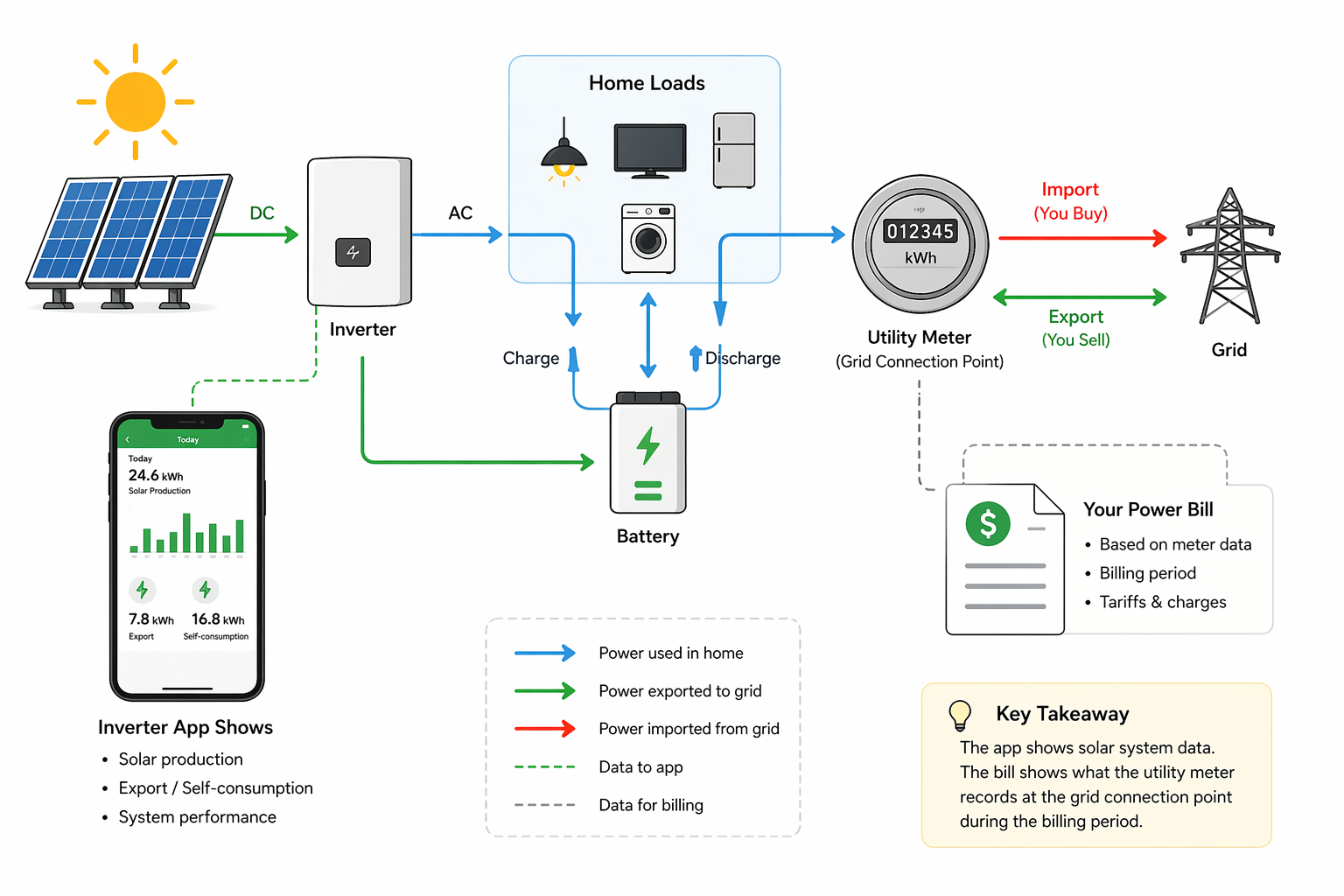
If your inverter app does not match your power bill, that usually does not mean something is broken.
In most homes, the two numbers are different because they are measuring different things, at different points, over different time periods.
Your inverter app usually focuses on solar production. Your electricity bill is based on what the utility meter recorded at the grid connection point, especially imports from the grid and sometimes exports to the grid.
That difference is the main reason homeowners get confused.
The short answer
Your inverter app and your electricity bill will not match unless they are reporting the same measurement.
Here is the simplest way to think about it:
| Number shown | What it usually means |
|---|---|
| Solar production | What your panels generated |
| Self-consumption | The solar energy your home used directly |
| Export | Extra solar sent to the grid |
| Import | Electricity bought from the grid |
| Your bill | Based mainly on import charges, export credits, fixed fees, and the billing period |
Those are not the same numbers, so they should not be expected to match.
A simple example
Imagine your solar system generates 24 kWh in one day.
Your home uses 18 kWh during that same day.
But the timing matters.
Let’s say:
- 10 kWh of your solar is used directly in the home
- 14 kWh is exported to the grid
- Later that evening, your home imports 8 kWh from the grid
Your inverter app may proudly show 24 kWh generated.
But your bill does not charge you based on solar generation. It mainly cares about:
- 8 kWh imported
- 14 kWh exported
- tariff rates
- fixed daily charges
- billing dates
So if you compare “24 kWh in the app” with “8 kWh imported on the bill,” they will look completely different even though both are correct.
The 7 most common reasons the numbers do not match
1. Your inverter app usually measures solar generation, not your billable energy
This is the biggest reason.
Most inverter apps are built to show how much solar your system produced. That is useful, but it is not the same as what the utility charges you for.
A grid bill is usually about:
- electricity imported from the grid
- electricity exported to the grid
- tariff timing
- daily supply charges
- demand charges in some homes
So the moment you compare generation in one system to billing in another, you are already comparing different categories.
A good homeowner test is this:
If the app says “PV generation”, and the bill says “energy usage” or “grid import”, they are not supposed to match.
2. The inverter and the utility meter are measuring at different points
Where the measurement happens matters.
An inverter typically measures energy at or near the solar system itself. A utility meter measures what crosses the boundary between your home and the grid.
That means the utility meter sees:
- electricity imported from the grid
- electricity exported to the grid
But it does not simply mirror whatever your solar inverter reports.
Between the solar panels and the grid connection, energy can go to several places:
- your home loads
- your battery
- the grid
- conversion losses inside the system
That is why the app and the bill naturally diverge.
3. Billing periods rarely line up with what you are looking at in the app
Many homeowners compare the wrong time window.
For example:
- the app may be showing a calendar month
- the bill may cover 31 or 34 days
- the app may update in real time
- the utility may settle data on a different schedule
If your bill runs from March 12 to April 14, but you compare it to the app’s April monthly total, the numbers will be off before you even start.
Before assuming there is a technical problem, line up:
- the exact billing start date
- the exact billing end date
- the exact measurement type
- whether the app is showing daily, monthly, or lifetime totals
4. Self-consumed solar never appears on the bill as imported electricity
This is another major source of confusion.
If your home uses solar directly in real time, that energy helps reduce imports from the grid. But it does not show up as a separate bill credit called “solar used at home.”
It just quietly reduces what you needed to buy.
That means a home can have:
- high solar production
- low exports
- moderate imports
- and still show a bill that feels “too high”
Why? Because solar helps most when it matches the timing of your loads.
If your largest usage happens after sunset, then even a strong solar production number in the app may not reduce your bill as much as expected.
5. Export and production are not the same thing
A very common mistake is to assume:
solar production = export
That is only true if your home uses almost none of the solar energy while it is being generated, which is rare.
In reality:
Solar production = self-consumption + battery charging + export + system losses
So if your inverter app says you produced 30 kWh, that does not mean you exported 30 kWh. Your bill may show much less exported energy because a chunk of that solar was used inside the home first.
6. Your utility meter is the billing authority, not the inverter app
Even if your inverter app looks detailed, the utility bill is normally based on the revenue-grade utility meter.
That means when there is a disagreement, the bill is usually relying on the measurement source that actually counts for settlement.
This does not automatically mean the inverter app is wrong in a serious way. It just means the app is usually not the final billing instrument.
Small differences can come from:
- inverter metering tolerances
- CT clamp tolerances
- rounding
- refresh delays
- losses in conversion or battery charging
- different aggregation rules
So the right question is often not “Which one is lying?” It is “Are these two systems measuring the same thing in the same way?”
7. Monitoring hardware or CT clamp setup can make the gap much worse
Sometimes the difference is normal. Sometimes it is larger because the monitoring setup is wrong.
This is especially common when a home has:
- add-on CT clamps
- a battery retrofit
- a hybrid inverter
- three-phase supply
- EV charger monitoring
- a smart meter plus separate solar monitoring system
Possible setup issues include:
- CT clamp installed on the wrong conductor
- CT arrow facing the wrong direction
- import and export signs reversed
- one phase missing in a three-phase system
- battery charge and discharge being counted oddly
- app totals combining estimated and measured values
When this happens, the app can report numbers that look plausible at first glance but still do not align with reality.
What should match, and what usually will not?
This is the easiest way to avoid confusion.
Numbers that often will not match directly
- inverter generation vs bill import
- inverter generation vs bill export
- monthly app total vs non-calendar billing cycle
- total household usage vs solar production
Numbers that may match more closely if the system is set up well
- export meter data vs bill export data
- grid import monitor vs bill import data
- billing-period totals from a whole-home meter vs billing-period utility totals
The key is to compare like with like.
A better way to compare your system
If you want to check whether your solar monitoring is behaving properly, compare these pairs instead:
Compare 1: Bill import vs whole-home grid import
Use a meter or app that measures grid import at the main connection, not just solar production.
Compare 2: Bill export vs export measurement
If your system has a proper export meter or accurate whole-home monitoring, compare that export figure with the feed-in line on the bill.
Compare 3: Billing-cycle dates vs billing-cycle dates
Do not compare a 30-day app month with a 33-day bill.
Compare 4: Daily patterns, not just totals
If your bill seems wrong, look for the shape of the day:
- strong daytime solar generation
- low midday imports
- exports rising near noon
- evening imports after sunset
The pattern usually reveals more than one big monthly total.
When the mismatch is completely normal
You usually do not have a real problem when:
- the inverter app shows production and the bill shows imports
- the date ranges are different
- the difference is explained by self-consumption
- the home uses a lot of electricity at night
- the system includes a battery and the app groups flows differently
- the bill export number is lower than solar generation
In these cases, the gap is usually a measurement-definition issue, not a fault.
When the mismatch may point to a real problem
It is worth digging deeper when:
- bill imports seem unusually high despite strong daytime solar
- export credits look far lower than expected for many billing cycles
- the app shows impossible flow patterns
- import appears during strong solar hours when house load is low
- battery charge and discharge numbers do not make sense
- one phase appears to behave very differently from the others
- the gap is large and persistent after date alignment
That is when you should look for:
- CT clamp orientation problems
- incorrect phase assignment
- wrong meter location
- inverter configuration issues
- battery monitoring logic problems
- tariff timing mismatches
- faulty assumptions about which number should match which
Homes with batteries are even easier to misread
Batteries add another layer of confusion because they move energy around in ways the bill does not show very clearly.
For example, solar energy can be:
- generated at noon
- stored in the battery
- used at 8 pm
- never exported at all
Your app may show this as excellent solar performance. Your bill may simply show lower evening imports.
That does not mean the battery data is wrong. It means the bill is only showing the grid side of the story.
Hybrid inverter systems can also blend:
- solar generation
- battery charging
- battery discharge
- house load
- grid import/export
If the monitoring design is weak, those numbers can be presented in a confusing way even when the hardware is technically working.
Homes on time-of-use or demand tariffs can look even stranger
A bill is not only about energy totals.
Two homes can import the same number of kWh and still get very different bills because of:
- time-of-use rates
- peak and off-peak windows
- shoulder periods
- demand charges
- fixed supply charges
- feed-in tariff rates
That means even if the app and the bill look “close” in raw energy terms, the cost outcome may still surprise you.
This is why homeowners should separate two questions:
- Are the energy numbers being measured correctly?
- Is the tariff structure making the bill higher than expected?
Those are related, but not the same.
What to check before you call your installer or retailer
Work through this checklist first.
1. Match the dates exactly
Use the exact billing period, not a calendar month.
2. Compare the right metrics
Do not compare solar generation with grid import.
3. Check whether your app includes whole-home monitoring
Some inverter apps show only solar production unless an extra meter or CT kit is installed.
4. Look for battery flow assumptions
If you have a battery, confirm whether charging and discharging are being shown separately and correctly.
5. Check for CT clamp or phase setup issues
This is especially important in retrofits and three-phase homes.
6. Review your tariff structure
High evening imports on a time-of-use tariff can make a bill look worse even when solar production is healthy.
7. Compare a few representative days
Do not rely only on one monthly total. A day-by-day check often reveals the real reason much faster.
The most useful mental model
The cleanest mental model is this:
- The inverter app tells the solar story
- The utility meter tells the grid story
- Your bill tells the money story
Those stories are related, but they are not identical.
Once you separate those three layers, most of the confusion disappears.
Bottom line
If your inverter app does not match your power bill, the most likely explanation is that they are measuring different things.
That is normal.
The app usually focuses on solar production or equipment-side energy flows. The bill is based on what the utility meter saw at the grid connection point during the billing period, combined with your tariff and fixed charges.
Only worry when the mismatch stays large after you have checked:
- the dates
- the metric being compared
- whether whole-home monitoring is installed
- whether CT clamps and phases are configured correctly
- whether a battery is changing the energy flow picture
In most homes, the problem is not that one number is wrong. It is that the homeowner is being shown two different views of the same energy system.
Practical next step
If you want to verify your system properly, write down these four numbers for the exact billing period:
- solar generation
- grid import
- grid export
- battery charge and discharge if applicable
Once those are separated clearly, it becomes much easier to work out whether the mismatch is normal, tariff-driven, or caused by a monitoring setup problem.
Related reading: